MtPix - Pixel Art Studio TemplateMtPix - Pixel Art Studio Template
MtPix is a professional HTML template tailored for pixel-art studios, independent designers, and indie / game teams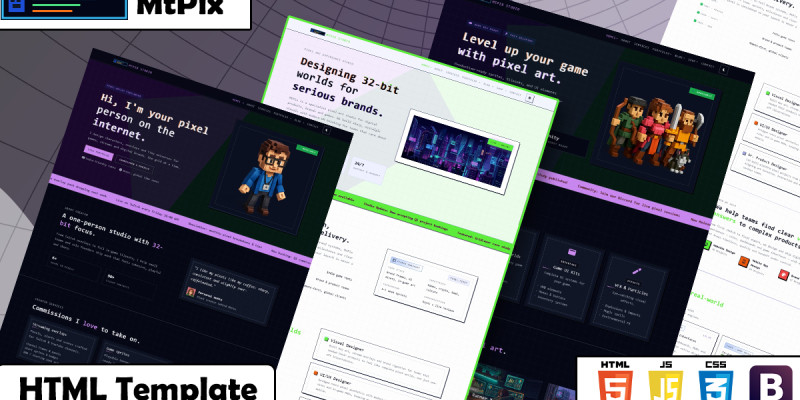
Overview
The template is structured and easy to customize, with ready-made sections for services, portfolio, pricing, testimonials, shop, and more, making it suitable for personal branding sites or small to mid-sized studios.
Technologies Used
- HTML5 for page and section structure.
- CSS3 for styling, layout, and hover/animation effects.
- Bootstrap 5 for the responsive grid system and layout utilities.
- Font Awesome for icons used in buttons and UI elements.
- Swiper.js for sliders/carousels (e.g. testimonials, portfolio).
- AOS (Animate On Scroll) to trigger animations on scroll.
- Custom CSS files such as
main.cssandresponsive.cssto control the visual identity and responsiveness.
Template Contents
The template ships with a set of ready-made pages / views, including (names may vary slightly per file):
- Home pages (Homes):
- Home 1 – Classic
- Home 2 – Agency
- Home 3 – Minimal
- Home 4 – Portfolio
- Home 5 – Gaming
- Home 6 – Personal
- Home 7 – SaaS
- Home 8 – Course
- Home 9 – Shop
- Home 10 – Event
- Inner pages:
- About – Studio / designer story and positioning.
- Services – Service list and packages.
- Portfolio + Portfolio Single – Showcase of projects with a case‑study detail page.
- Blog – Multiple layouts (grid, list, masonry, with/without sidebar).
- Shop – Store pages (grid, list, featured, product detail).
- Contact – Contact / inquiry page.
- Additional sections inside the main home (Pricing, Testimonials, Experience, News Ticker, etc.).
Who Is This Template For?
- Pixel‑art studios that want a website matching their visual style.
- Freelance designers offering UI, branding, or game art services.
- Game and indie teams to present their projects, games, asset packs, and tilesets.
- Digital agencies that want a dedicated Pixel Art themed landing or sub‑brand.
Example Use Cases
- Main website for a pixel‑art design studio.
- Landing page for a course, asset pack, or tileset collection.
- Personal portfolio for a UI / visual designer or illustrator.
- Marketing site for an indie game, NFT / gaming project, or digital product.
Features
- Modern 32‑bit pixel art design inspired by retro games with a strong visual identity.
- Professional section layout (Hero, About, Services, Portfolio, Pricing, Testimonials, Blog, Shop, Contact…).
- Smooth user experience with subtle, well‑considered animations.
- Fully responsive design that works great on desktop, tablet, and mobile.
- Custom cards for services, projects, clients, pricing and more.
- Easy to customize thanks to clean, well‑structured HTML and CSS.
- Compatible with modern browsers and optimized for SVG and pixel graphics.
Requirements
- Code editor Any modern text editor such as Visual Studio Code, Sublime Text, Atom, or Notepad++.
- Modern web browser Latest version of Chrome, Firefox, Edge, Safari, or any Chromium-based browser for correct rendering.
- Basic web knowledge Familiarity with HTML and CSS is recommended for customizing the template. JavaScript knowledge is helpful but not strictly required for simple edits.
- No server-side dependencies This template is built with static HTML, CSS, and JavaScript. No database or back-end framework is required to use the demo.
Instructions
- . Unzip the package
Extract the downloaded
.zipfile to your preferred location on your computer. - 2. Explore the folder structure
index.html(and other.htmlfiles) – main pages of the templateassets/css/– stylesheets (e.g.main.css,responsive.css)assets/js/– JavaScript filesassets/img/– images and icons used in the template
- 3. Preview the template
Open
index.html(or any other demo HTML file) directly in your browser by double‑clicking it or dragging it into the browser window. - 4. Edit page content
Open the
.htmlfiles in your code editor and modify text, images, and sections as needed. Save the file and refresh your browser to see changes. - 5. Customize styles
Edit
assets/css/main.cssandassets/css/responsive.cssto change colors, fonts, spacing, and layout details. Use your browser’s DevTools (Inspect Element) to quickly locate the relevant classes. - 6. Replace images
Put your own images in
assets/img/and update the image paths in the HTML files if filenames change. - 7. Deployment
Upload all HTML files and the
assetsfolder to your web hosting (usually into thepublic_htmlorwwwdirectory). Ensure the folder structure remains the same so all links, styles, and scripts work correctly.


Information
| Category | Themes / HTML / Business |
| First release | 9 December 2025 |
| Last update | 9 December 2025 |
| Files included | .css, .html, Javascript .js |
| Tags | landing page, contact form, pricing tables, pixel art, bootstrap 5, gaming website, retro style, blog layout, responsive html, multipage template, portfolio layout, shop layout, testimonials section, animated sections, neon style |