PDF Converter PDF Tools - Android Source CodePDF Converter PDF Tools - Android Source Code
All-in-one PDF Tools: Merge, Compress, Convert PDFs. Image to PDF, PDF to Image
PDF Converter PDF Tools - Android Source Code
All-in-one PDF Tools: Merge, Compress, Convert PDFs. Image to PDF, PDF to Image
Screenshots


Overview
PDF Converter PDF Tools
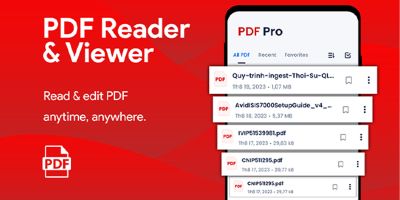
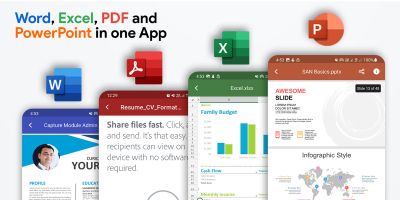
PDF Converter PDF Tools is an All-in-one PDF Tools application designed to handle everyday PDF tasks quickly and easily. With a clean interface and simple workflow, users can manage documents without hassle.
Using this app, you can Merge, Compress, and Convert PDF files, as well as perform popular conversions like Image to PDF and PDF to Image. It’s built for smooth performance and a user-friendly experience.
Key Highlights
- All-in-one PDF Toolkit – multiple PDF utilities in one app
- Merge PDFs – combine multiple PDF files into a single document
- Compress PDFs – reduce PDF size for easy sharing and storage
- Convert PDFs – supports PDF conversions available in the app
- Image to PDF – convert images into a PDF document
- PDF to Image – export PDF pages as images
- Simple UI – clean layout, easy navigation
This project is ideal for developers who want a ready-to-use PDF tools solution that can be customized and published as their own product.
Features
Features
- All-in-One PDF Tools – multiple PDF utilities in a single application
- Merge PDF – combine multiple PDF files into one document
- Compress PDF – reduce PDF file size without losing quality
- PDF Converter – convert PDFs using supported formats in the app
- Image to PDF – create PDF files from images
- PDF to Image – export PDF pages as image files
- Fast Processing – optimized performance for quick conversions
- Clean & Modern UI – user-friendly and easy to navigate design
- Offline Support – core features work without internet
- Easy Integration – ready-to-use project structure
Requirements
Requirements
- Android Studio (latest stable recommended)
- Android SDK installed and configured
- Minimum Android version: Android 5.0 (Lollipop) or higher (recommended)
- Gradle (included with Android Studio)
- Java / Kotlin environment (based on the project setup)
- Internet connection (only if your build/features require online processing or dependencies)
Recommended
- Device/Emulator for testing
- Basic knowledge of Android app build & release process (APK/AAB)
Instructions
Reskin / Customization Instructions
Product: PDF Converter PDF Tools — Android Source Code
Fully Reskinnable • Step-by-step GuideQuick Checklist (Before Publishing)
- Change App Name
- Change Package Name / Application ID (recommended)
- Replace App Icons
- Update Theme / Colors
- Update Splash Screen
- Replace Logos / Images
- Update AdMob IDs / API Keys (if included)
- Build Signed APK / AAB
1) Change App Name
Open: res/values/strings.xml
Replace the value of app_name:
<code><string name="app_name">PDF Converter PDF Tools</string></code>
Set it to your brand name:
<code><string name="app_name">Your App Name</string></code>
2) Change Package Name (Recommended)
- Open the project in Android Studio
- In Project panel, find the current package (e.g.
com.example.app) - Right-click → Refactor → Rename → Rename Package
- Choose Rename all occurrences
Also confirm/update applicationId in:
app/build.gradle (or app/build.gradle.kts)
3) Change App Icon
Replace icon files in these folders (keep the same file names):
res/mipmap-hdpires/mipmap-mdpires/mipmap-xhdpires/mipmap-xxhdpires/mipmap-xxxhdpi
4) Change Theme Colors
Update your branding colors here:
res/values/colors.xml
If the app uses Material theme, also review:
res/values/themes.xmlres/values-night/themes.xml(Dark Mode)
5) Change Splash Screen
Android 12+ Splash API
res/values/themes.xmlres/values-v31/themes.xml
Update splash background color and splash icon configuration there (if used).
Custom Splash Layout
res/layout/(example:activity_splash.xml)res/drawable/(replace splash logo image)
6) Change Branding Images / Graphics
Replace images while keeping the same names, or update references in layout files:
res/drawable/res/raw/(if animations/Lottie are used)
Fonts (Optional)
- Add fonts to
res/font/ - Apply via theme or XML layouts
7) Update AdMob IDs / API Keys (If Included)
Before publishing, replace demo/test IDs with your own production values.
- AdMob App ID:
AndroidManifest.xml - Ad Unit IDs: search the project for keywords like:
AdMob,app_id,banner,interstitial,reward,API_KEY
Build Signed APK / AAB (Release)
- Android Studio → Build → Generate Signed Bundle / APK
- Select Android App Bundle (AAB) for Play Store, or APK for direct install
- Create / choose a keystore
- Generate and test the release build
Final Notes for Review
- This item is fully reskinnable.
- Reskinning requires changing resource files only (name/icons/colors/splash/assets).
- No core PDF logic or main features need to be modified.
Other items by this author


| Category | App Templates / Android / Applications / Utility |
| First release | 15 January 2026 |
| Last update | 26 January 2026 |
| Operating Systems | Android 7.0, Android 8.0, Android 9.0, Android 10.0, Android 11.0, Android 12.0 |
| Files included | .html, .apk, .java, .xml |
| Tags | pdf pdf tools pdf converter pdf merger merge pdf compress pdf image to pdf pdf to image android app android studio java xml admob android source code app template |