
Quick Chat Checkout WhatsApp Order WooCommerceQuick Chat Checkout WhatsApp Order WooCommerce
Quick Chat Checkout WhatsApp for Order WooCommerce
Quick Chat Checkout WhatsApp Order WooCommerce
Quick Chat Checkout WhatsApp for Order WooCommerce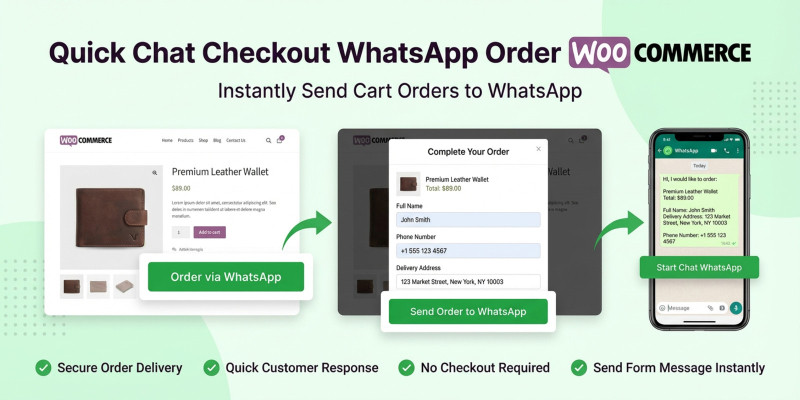
Screenshots


Overview
Quick Chat Checkout WhatsApp Order pour WooCommerce est une extension WooCommerce performante conçue pour faciliter la connexion entre votre boutique et WhatsApp. Au lieu d'un processus de commande complexe en plusieurs étapes, vos clients remplissent un formulaire simple et envoient leur commande directement à votre numéro WhatsApp.
Features
* Expérience de popup fluide : aucune recharge de page, pour une navigation utilisateur optimale.
* Prise en charge des produits variables : détection et inclusion automatiques des options sélectionnées telles que les couleurs et les tailles.
* Sécurité des données : Utilisation de nonces et de nettoyage côté serveur pour prévenir le spam.
* Facilité de développement : Code propre et documenté, conforme aux standards WordPress.
* Entièrement responsive : Optimisé pour les interactions tactiles sur appareils mobiles.
* Compatibilité avec les shortcodes : [chat_checkout] Placez le bouton où vous le souhaitez sur votre site.
Requirements
Utilisez cette liste pour vous assurer que les acheteurs savent exactement ce dont ils ont besoin pour exécuter votre plugin :
- WordPress : 5.8 ou supérieur
- WooCommerce : 5.0 ou supérieur
- Version PHP : 7.4 ou supérieure
- Compatibilité navigateurs : Chrome, Firefox, Safari, Edge
Instructions
Téléverser : Téléversez le quick-chat-checkoutdossier dans votre /wp-content/plugins/répertoire.
Activation : Accédez au menu « Extensions » de l’administration WordPress et cliquez sur « Activer ». Configuration : Dans votre tableau de bord, accédez à Réglages > Paiement par chat .
Numéro WhatsApp : Saisissez votre numéro WhatsApp complet, y compris l’indicatif du pays (par exemple :+33612345678).
Emplacement du bouton : Le bouton « Commander via WhatsApp » apparaîtra automatiquement à côté du bouton « Ajouter au panier ».


| Category | Plugins / WooCommerce |
| First release | 11 February 2026 |
| Last update | 27 February 2026 |
| Supported CMS | WooCommerce 6.x, WordPress 5.8, WordPress 5.9, WooCommerce 7.x, WooCommerce 8.x, WordPress 6.0, WordPress 6.2, WordPress 6.3, WordPress 6.4, WordPress 6.6, WordPress 6.7, WordPress 6.8 |
| Files included | .php, .css, .html, .sql, Javascript .js |
| Tags | chat, woocommerce, e-commerce, plugin, messaging, store, whatsapp, checkout, sales, direct order, quick buy, mobile order |