Home / App Templates / Android / Applications / Productivity

Corix Notepad - Android Source CodeCorix Notepad - Android Source Code
Premium Flutter Notepad with Student Study Mode, Teacher Assistant Tools, Daily Routine, and AdMob + StartApp Integration.Home / App Templates / Android / Applications / Productivity
Corix Notepad - Android Source Code
Premium Flutter Notepad with Student Study Mode, Teacher Assistant Tools, Daily Routine, and AdMo...
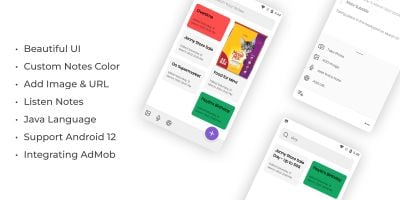
Screenshots


Overview
Corix Notepad is a premium, all-in-one productivity application built with Flutter. It is designed to be the ultimate tool for both students and teachers, combining a powerful note-taking system with specialized educational modules.
The app features a modern Material 3 UI, clean code architecture, and a local SQLite database for offline functionality. It also comes integrated with dual monetization options (AdMob & Start.io), ensuring you can start earning revenue immediately after publishing.
Whether you want to launch a student planner, a teacher's tool, or a high-end notepad, this source code provides a solid and scalable foundation.
Features
- Advanced Rich Text Editor: Full text formatting (Bold, Italic, Lists) using Flutter Quill.
- Student Study Mode: Subject & Chapter management with study hour tracking.
- Study Analytics: Beautiful interactive charts (Pie & Bar) to visualize study progress.
- Teacher Assistant Dashboard:
- Student Attendance Management.
- Class Routine & Student Lists.
- Lesson Plans, Homework, and Exam Planners.
- Syllabus Tracker & Exportable Reports.
- Classroom Tools: Built-in Quick Board (Drawing), Class Timer, and Routine management.
- Daily Routine Planner: Plan your day with automated local notification reminders.
- Dual Ads Integration: Google AdMob (App Open, Banner, Interstitial) + Start.io (StartApp) as fallback.
- Data Management: Secure SQLite storage with built-in Backup and Restore system.
- Themes: Full support for Dynamic Light and Dark modes.
Requirements
- Flutter SDK: Version 3.10.4 or higher.
- Programming Language: Dart.
- IDE: Android Studio or VS Code.
- Java Development Kit: JDK 11 or 17.
- Accounts: Google AdMob and/or Start.io (StartApp) for advertisements.
- Operating System: Compatible with Android (API 21+) and iOS.
Instructions
- Extract: Unzip the source code file.
- Project Open: Open the folder in Android Studio or VS Code.
- Get Packages: Open the terminal and run
flutter pub get. - Change Package Name: Update the
applicationIdinandroid/app/build.gradle. - Setup Ads: Replace the AdMob Unit IDs and StartApp App ID in
lib/services/ads_manager.dartandAndroidManifest.xml. - Icon Change: Replace
assets/icon/icon.pngwith your logo and runflutter pub run flutter_launcher_icons. - Build: Run
flutter build apk --releaseto generate your final app.
Refer to the included Documentation.html for a more detailed step-by-step guide.
Other items by this author


Information
| Category | App Templates / Android / Applications / Productivity |
| First release | 17 April 2026 |
| Last update | 17 April 2026 |
| Operating Systems | Android 7.0, Android 8.0, Android 9.0, iOS 12.0, Android 10.0, iOS 14.0, iOS 13.0, iOS 15.0, Android 11.0, Android 12.0, Android 5.0, Android 6.0 |
| Files included | .html, .apk, .db |
| Tags | notes, source code, admob, android app, Productivity, Notepad, startapp, SQLite, Student App, flutter, attendance manager, study planner, routine planner, teacher assistant, rich text |