


Home / App Templates / Unity / Templates / Puzzle
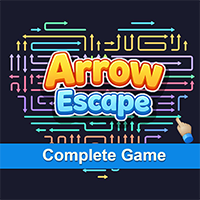
Arrow Escape - Complete Game TemplateArrow Escape - Complete Game Template
Arrow Escape is a production-ready arrow puzzle game template built with Unity, featuring Arrow, Pencil, and Snake themes. Average rating of 5.0 based on 4 votes
Recently Updated
Average rating of 5.0 based on 4 votes
Recently Updated
Home / App Templates / Unity / Templates / Puzzle
Arrow Escape - Complete Game Template
Arrow Escape is a production-ready arrow puzzle game template built with Unity, featuring Arrow, ...
Average rating of 5.0
26 Support questions or comments
Please login or create an account to post a question or comment.
-
 4 weeks agoHello
I want to contact you through whatsapp so can you please provide your no.
-
1 month agotulc PurchasedHow to build iOS and which AdMob version to use on Xcode 15.4
-
1 month agotulc Purchasedad not show when test, how to enable admob ad test ?
-
 1 month agoTheVayuputraDeveloper AuthorKindly check this Video.
https://youtu.be/6CmTUf50ZLc?si=2HPsPSrnAA4s7g2g&t=150
-
1 month agoabhisheksingla1 PurchasedCan this project works in unity (6000.4.8f1)
-
1 month agoTheVayuputraDeveloper AuthorYes, it will work with Unity 6000.4.8f1
-
2 months agoAlijan PurchasedIf I have upgraded my game level, how do I check if my level has been added to the game?
-
2 months agoTheVayuputraDeveloper AuthorAfter upgrading or adding new levels, you can check them in the game by increasing the total level count in the Level Manager or level JSON file.
Then run the game and play until the new level number appears, or directly set the current level number from Unity Inspector for testing.
-
2 months agoAlijan Purchasedi have 0 experiences after download that can i do
-
2 months agoTheVayuputraDeveloper AuthorHello,
You need basic experience with Unity to open, edit, and build the project.
If you are a beginner, you can still use the template by following the included documentation. -
2 months agoAlijan PurchasedI'm fessing this issue A failure occurred while executing com.android.build.gradle.internal.tasks.CheckAarMetadataWorkAction See the Console for details.
-
2 months agoTheVayuputraDeveloper AuthorThis issue usually happens because a plugin/library requires a higher Android SDK or newer Gradle version.
Try these fixes:
• Set Target API Level to Automatic (highest installed) or API 34
• Update Gradle plugin to version 8.2.2
• Update Gradle wrapper to Gradle 8.2
• Set minSdkVersion 23, targetSdkVersion 34, compileSdkVersion 34
• Delete Library, Temp, and .gradle folders, then rebuild the project
Usually caused by AdMob, Firebase, AndroidX, or outdated Unity version.
-
2 months agoSohaPan Purchasedhi .. i wanted to ask how can i change the sequence of the levels and if i wanted to remove or add any level
-
2 months agoTheVayuputraDeveloper AuthorHello,
Levels are stored as JSON files with level numbers.
If you want to change the sequence, replace, remove, or add levels, you can simply rename the JSON files accordingly.
Example:
Level_1.json
Level_2.json
Level_3.json
You can replace any level by renaming your new JSON file with that level number.
-
2 months agoAlijan PurchasedHello
Before purchasing this template,i want to confirm if i upload this game in play store can i face copyright issues -
2 months agoTheVayuputraDeveloper AuthorHello,
No, you will not face any copyright issues if you legally purchase the Arrow Escape template and publish your customized game on the Play Store.
You can reskin, modify, and monetize the game freely.
Only reselling or sharing the source project/template is not allowed. -
2 months agoAlijan PurchasedOkay
-
2 months agoAlijan PurchasedOkay
-
2 months agojayone PurchasedHello,
Before purchasing this template, I need to check easy level creation using images.
Would you please share the video that shows how good does Easy-Level-Creation feature work?
Best regards, -
2 months agoTheVayuputraDeveloper AuthorThank you for your interest in our template 😊
You can check the Easy Level Creation feature in this video:
https://youtu.be/hEB_UOmimyo?si=4P99JV0I7N3q2hDI&t=1
The video demonstrates how the level editor works, including image-based level generation and quick level setup.
-
2 months agosinan60 Purchasediyi günler . yeni sürümü eski projeme nasıl entegre edebilirim ? Nasıl indirip güncelleyecegim kendi projeme ?
-
2 months agoTheVayuputraDeveloper AuthorHello, good day 😊
Important:
Please make a full backup of your project before updating.
Make sure your Unity version is compatible with the asset version.
If you face any errors, feel free to send screenshots and we will help you 😊
To integrate the new version into your existing project, please follow these steps:
We recommend importing the new version into a fresh empty Unity project first.
Backup your custom files from the old project (levels, settings, Ad IDs, etc.).
Then replace/copy the TheVayuputra folder from the new version into your old project.
If you made custom modifications in scripts, you may need to reapply those changes manually.



Information
| Category | App Templates / Unity / Templates / Puzzle |
| First release | 12 January 2026 |
| Last update | 12 May 2026 |
| Files included | .cs, .unityproj, .prefab |
| Tags | template, game, 2d, Puzzle, pack, complete game template, hyper casual game, puzzle game template, mobile puzzle game, casual puzzle, arrow puzzle |

