
Ultimate QR Code GeneratorUltimate QR Code Generator
Create and customize high-quality QR codes effortlessly with our Ultimate QR Code Generator. Average rating of 5.0 based on 1 votes
Recently Updated
Average rating of 5.0 based on 1 votes
Recently Updated
Ultimate QR Code Generator
Create and customize high-quality QR codes effortlessly with our Ultimate QR Code Generator.
Average rating of 5.0
Screenshots


Overview
With an Extended License Get PDF and MP3 QR Code Module
Project Overview
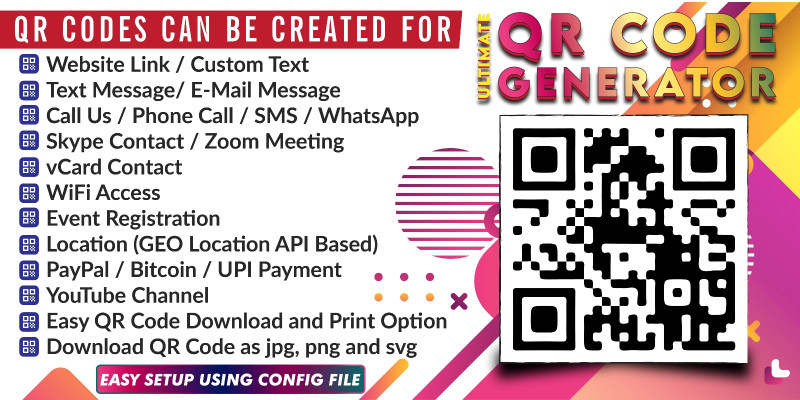
Ultimate QR Code Generator is a web-based tool that allows users to create QR codes for various types of data including text, email addresses, geographical locations, phone numbers, and more. It provides an easy-to-use interface for generating QR codes that can be used for different purposes such as marketing, information sharing, and personal use.
Features
Key Features
- QR Code Generation:
- Link: Create QR codes for URLs and web addresses.
- Text: Generate QR codes for plain text messages.
- Email: Create QR codes for email addresses.
- Location: Generate QR codes for geographical locations.
- Phone: Create QR codes for phone numbers.
- SMS: Generate QR codes for text messages.
- WhatsApp: Create QR codes for WhatsApp messages.
- Skype: Generate QR codes for Skype contact information.
- Zoom: Create QR codes for Zoom meeting links.
- WiFi: Generate QR codes for WiFi network information.
- YouTube: Create QR codes for YouTube video links.
- vCard: Generate QR codes for digital business cards.
- PayPal: Create QR codes for PayPal payment links.
- Bitcoin: Generate QR codes for Bitcoin wallet addresses.
- UPI Payment: Create QR codes for UPI payments.
- Event: Generate QR codes for event details.
- PDF (New): Create QR codes linked directly to uploaded PDF documents.
- MP3 (New): Generate QR codes linked directly to uploaded audio files.
- Image (New): Create QR codes linked directly to uploaded images and photos.
- Video (New): Generate QR codes linked directly to uploaded video clips.
- Excel (New): Create QR codes linked directly to uploaded Excel spreadsheet documents.
- Word (New): Generate QR codes linked directly to uploaded Word document files.
- Text File (New): Create QR codes linked directly to uploaded plain text (
.txt) or CSV data files.
- Customizable QR Codes:
- Color: Choose foreground and background colors.
- Size: Adjust the size of the QR code.
- Preview and Download:
- QR Code Preview: View a live preview of the QR code.
- Download: Save the generated QR code image.
- User-Friendly Interface:
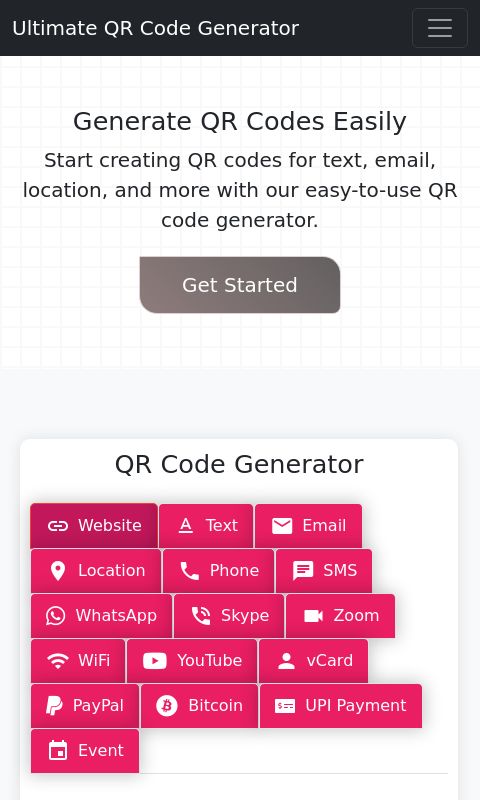
- Tabbed Navigation: Navigate between QR code types and settings.
- Form Validation: Ensure all required fields are filled out.
- Responsive Design: Mobile-friendly interface.
🎨 Premium Theme Consolidation
- All-in-One Premium Layout: The entire website has been consolidated into a single, high-end modern layout. The old basic template has been removed, providing a consistent, clean, and professional design for your users.
⚙️ Advanced Settings Managed in Admin
- Custom File Expiry & Lifetime Management: You can now set relative expiration timelines (in Days) or toggle permanent storage (Lifetime) for each file type (PDF, MP3, Images, etc.) directly in the admin dashboard.
- Trouble-Free Admin Panel: Fixed all settings conflict bugs. You can now add, edit, and delete FAQ items or adjust website settings seamlessly without losing your uploaded custom logo or other configured variables.
🚀 New Advanced Features for Users
- Upload Expiry Visibility: Users now see exactly when their uploaded files are scheduled to expire on the screen immediately after uploading.
- Smart File Pickers: Upload boxes automatically filter user files (e.g. only showing audio files on the MP3 tab), preventing incorrect uploads.
- Quick Copy & Clean Print:
- Users can copy the QR code image directly to their clipboard with one click to paste it anywhere.
- Admin Dashboard URL:
http://<your-domain>/kodeadmin/ - Username:
admin - Password:
password123(You can change this password at any time inside the "Site Settings" section of your admin panel).
Admin Feature
1. General Site Settings
- Logo Management: Choose between a clean text logo or upload a custom image logo.
- Branding Details: Customize your website name, contact email, and support phone number.
- Password Controls: Safely update the admin login credentials at any time.
2. SEO & Search Engine Optimization
- Meta Tags Management: Edit your search engine titles, descriptive meta sentences, and search keywords to help your website rank better on Google.
3. Social Media Links
- Social Widgets: Update links to your Facebook page, Twitter/X account, and Instagram profile to dynamically display in the site footer.
4. Footer & Copyright Customization
- Copyright text: Customize the copyright statement at the bottom of your site.
- Custom Signature/Credit Links: Set custom signature text (e.g. "Crafted with heart") and link it to your personal or agency website.
5. Tool Management (Turn QR Options On/Off)
- Feature Toggle Grid: Easily activate or deactivate individual QR code tools (e.g. turning off PayPal, Bitcoin, or Video QRs if you don't need them).
6. File Upload & Expiry Controls
- Size Limit Controls: Set maximum file size limits (in Megabytes) for uploaded files.
- Expiry Management: Decide whether uploaded user files (like PDFs, MP3s, Images, Videos) should stay online forever (Lifetime) or expire automatically after a certain number of days.
7. Interactive FAQ Manager
- Add, Edit, & Delete FAQ items: Manage your frequently asked questions list dynamically. Items saved here are instantly published to the homepage FAQ accordion.
8. Custom CMS Pages Editor
- Content Editor: Update structural page titles and write content text for pages like "About Us," "Terms of Service," and "Privacy Policy."
9. File Manager & Storage Status
- Real-time Storage Usage: Monitor exactly how much disk space is being used out of your total allowed storage limit (e.g.,
5.2MB / 1000MB). - Clean & Delete Files: Browse all uploaded user files, view their upload dates, see how many times they have been downloaded, and manually delete any file to free up storage.
- CSV Export: Export your entire uploaded file history log to a spreadsheet file.
10. Dashboard Analytics & Statistics
- Performance Overview: Track quick counters for total files uploaded, total downloads across all user QR links, and see which file formats are being generated the most.
Requirements
Shared Hosting
Basic Technical Knowledge
Instructions
- Support and FAQ:
- FAQ Section: Answers to common questions.
- Contact Form: Get in touch with support.
- Documentation included in Zip file
Reviews
-
Sep 15, 2024

Other items by this author












Additional options
|
PHP Script Installation Service
Don't worry about the installation of your script! Have your PHP Script installed for you.
|
$39 | Buy now |

Information
| Category | Scripts & Code / PHP Scripts / Miscellaneous |
| First release | 22 July 2024 |
| Last update | 22 June 2026 |
| Software version | PHP 7.4, PHP 8.0, PHP 8.1, PHP 8.2 |
| Files included | .php, .css, .html, Javascript .js |
| Tags | qr code scanner, qr code generator, qr code reader, dynamic qr code generator code, dynamic qr code generator plugin, dynamic qr code scanner, qr code generator extension, qr code generator plugin, responsive qr code, scan qr code online, smart qr code generator |