AI PDF Scanner - iOS App Source CodeAI PDF Scanner - iOS App Source Code
Ask questions, get summaries and find answers instantly
AI PDF Scanner - iOS App Source Code
Ask questions, get summaries and find answers instantly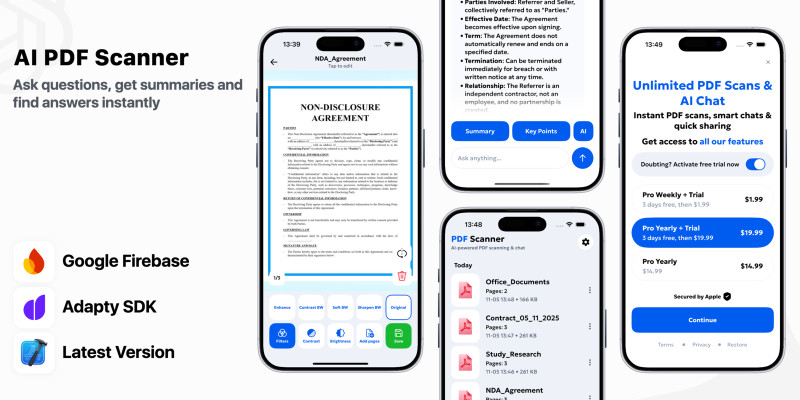
Screenshots


Overview
Unlock the Future of Smart Document Workflows with AI PDF Scanner & Editor – Premium iOS App Source Code
Step into the world of intelligent productivity with AI PDF Scanner & Editor, a powerful all-in-one iOS app that lets users scan, edit, summarize, and chat with their PDF documents instantly. Whether analyzing contracts, research papers, or handwritten notes — this AI-powered solution turns every document into actionable insights in seconds.
Built with Swift and UIKit, integrated with Firebase and Adapty SDK, and powered by advanced OpenAI models, this ready-to-launch source code provides everything you need to create a high-performing, monetizable AI document assistant for iOS.
Key Features
• Smart PDF Scanner – Capture high-quality scans using your iPhone camera with automatic edge detection, filters, and brightness adjustment.
• Built-in PDF Editor – Annotate, highlight, crop, rotate, and merge documents directly inside the app.
• AI Document Assistant – Ask questions, summarize content, and extract key insights from any PDF instantly using AI.
• Instant Summaries & Explanations – Turn complex legal, academic, or technical documents into clear, concise overviews.
• Organized File Manager – Store, rename, and categorize all your scanned and imported PDFs for quick access.
• Adapty SDK Integration – Monetize with premium plans, free trials, and flexible paywall management.
• Firebase Backend – Manage analytics, user authentication, remote configuration, and cloud syncing securely.
• MVVM Architecture – Clean, modular, and scalable design ready for easy customization and future features.
• Customizable UI System – Centralized assets, typography, and color scheme for quick rebranding.
• Secure & Compliant – Built in line with Apple’s privacy and data protection policies.
• App Store Ready – Fully optimized for the latest iOS SDKs, ensuring a smooth and quick submission process.
Why Choose AI PDF Scanner & Editor?
AI PDF Scanner & Editor isn’t just a utility app — it’s a complete AI-driven productivity ecosystem.
Perfect for students, professionals, and business users who need to scan, edit, and understand documents faster.
It offers:
• Complete document scanning and editing tools
• AI chat for instant summaries and answers
• Subscription monetization via Adapty SDK
• Firebase analytics and remote paywall control
• Elegant native iOS experience with scalable MVVM architecture
Built for Productivity, Monetization & Growth
AI PDF Scanner & Editor is not just source code — it’s a ready-to-launch business in the high-demand AI productivity market.
With premium AI capabilities, built-in editing, and subscription monetization, it’s your fastest way to launch a professional-grade document app powered by artificial intelligence.
Save months of development and deliver the next-generation PDF experience today.
Features
- Native iOS Development – Built entirely with Swift and UIKit for fast performance and full iOS compatibility.
- MVVM Architecture – Clean, modular, and scalable codebase designed for easy maintenance and customization.
- Smart PDF Scanner – Capture clear scans using your camera with automatic edge detection, filters, and brightness tools.
- PDF Editor Tools – Edit directly inside the app: crop, rotate, merge, annotate, highlight, and add notes.
- AI Document Chat – Ask questions and get instant, human-like answers from your PDFs powered by OpenAI.
- AI Summaries & Key Points – Quickly generate summaries and extract essential details from long documents.
- File Manager – Organize, rename, and store all scanned and imported files in a structured, searchable library.
- Adapty SDK Integration – Complete monetization system with subscriptions, free trials, and paywall placement control.
- Google Firebase Integration – Secure backend for analytics, user authentication, and remote configuration.
- Multi-Paywall Support – Easily configure multiple subscription screens, prices, and trial options remotely.
- Customizable UI System – Centralized assets, colors, and typography for seamless rebranding.
- Offline Mode Support – View and manage scanned documents without an internet connection.
- Secure & Compliant – Adheres to Apple’s privacy policies and ensures safe user data handling.
- Optimized AI Performance – Fast, reliable, and responsive AI interactions with minimal latency.
- App Store Ready – Fully tested, optimized for the latest iOS SDKs, and ready for instant publishing.
Requirements
- Xcode 14.0 or later: Required for iOS development and building the project.
- iOS 15.0 SDK or later: The project targets iOS 15.0 and above.
- Swift 5.5 or later: The codebase is written in Swift and requires a compatible version.
- Swift Package Manager (SPM): To manage dependencies like Firebase and AppHud SDK.
- Firebase Account: For Firebase Analytics and Authentication integration. You’ll need to set up a Firebase project and download the
GoogleService-Info.plistfile. - Adapty Account: Required for handling in-app subscriptions and purchases. You'll need to configure Adapty in your app with the necessary API keys.
- macOS 12.0 or later: Required for running the latest version of Xcode and building the project.
Instructions
- Change the Bundle Identifier: Update the bundle ID in the project’s settings to match your app's unique identifier.
- Important: Re-skin the app completely before submitting to the App Store. Usage of the original UI assets is strictly prohibited for submission.
- Set Up Firebase: Add your
GoogleService-Info.plistfile to the project for Firebase Analytics and Authentication. - Configure Adapty: Integrate your Adapty API key for handling in-app subscriptions.
- Swift Package Manager (SPM): Ensure dependencies are resolved through SPM for Firebase and AppHud.
- Read the Documentation: Review the documentation for detailed steps on customization, configuration, and deployment.
- Final Steps: Once the app is customized and configured, you’re ready for testing and deployment!
Other items by this author










| Category | App Templates / iOS / Applications / Miscellaneous |
| First release | 5 November 2025 |
| Last update | 5 November 2025 |
| Operating Systems | MacOS 10.14, iOS 14.0, iOS 15.0 |
| Files included | .xib, .nib, .swift |
| Tags | chat, image, iOS, editor, google, swift, subscription, converter, ai, Open, pdf, firebase, scanner, chatpdf, summarize |