Revenue Recovery Suite For WooCommerceRevenue Recovery Suite For WooCommerce
Transform abandoned carts into revenue with multi-channel recovery, AI intelligence, and gamified exit intent for WooCommerce
Revenue Recovery Suite For WooCommerce
Transform abandoned carts into revenue with multi-channel recovery, AI intelligence, and gamified...
Screenshots



Overview
💰 Revenue Recovery Suite
The Ultimate WooCommerce Abandoned Cart Recovery Solution
Transform your abandoned carts into recovered revenue with the most comprehensive multi-channel recovery solution for WooCommerce. Stop losing sales and start recovering them automatically with intelligent, personalized engagement.
🎯 Did you know? The average cart abandonment rate is 69.8%. That means nearly 7 out of 10 potential customers leave without purchasing. Revenue Recovery Suite helps you win them back through Email, SMS, WhatsApp, Messenger, and Web Push notifications.
🚀 Why Choose Revenue Recovery Suite?
Multi-Channel Recovery
Reach customers via Email, SMS, WhatsApp, Facebook Messenger, and Web Push. Don't rely on just one channel!
Gamified Exit Intent
Capture abandoning visitors with a "Spin-to-Win" wheel or standard popups. Proven to increase conversions!
AI-Powered Intelligence
VIP segmentation, scarcity messaging, and A/B testing automatically optimize your recovery campaigns.
✨ Production-Ready Integrations
Twilio • Meta Cloud API • Firebase • Bit.ly • OpenAI
No placeholders. Real API integrations that work out of the box.
Whether you're a small shop or a large e-commerce business, Revenue Recovery Suite adapts to your needs with a modern, beautiful admin dashboard, real-time analytics, and complete documentation.
Features
🎯 Comprehensive Feature Set
- ✓ Email Recovery: Automated abandoned cart emails with dynamic content and A/B testing
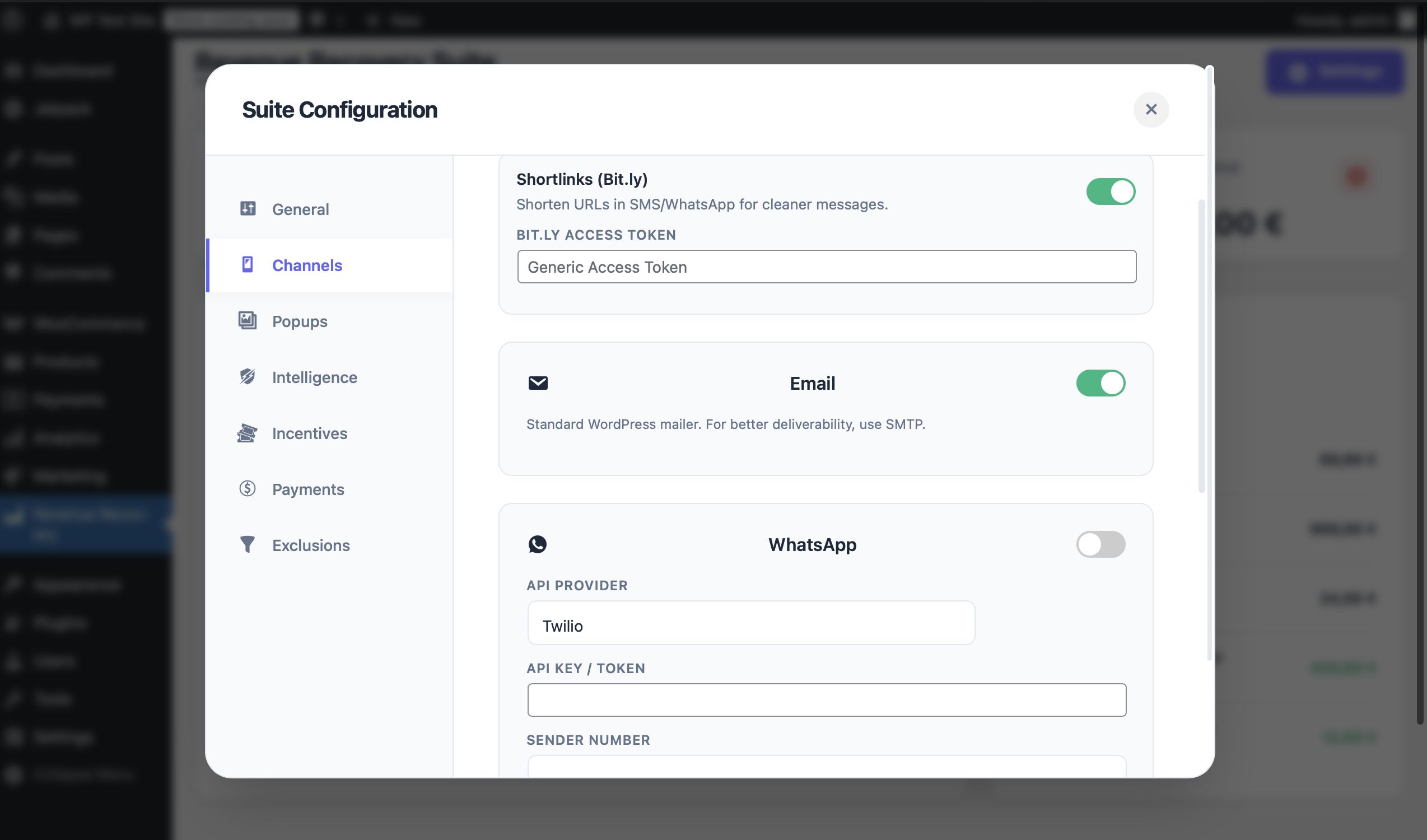
- ✓ SMS Notifications: Instant text messages via Twilio integration
- ✓ WhatsApp Messaging: Rich media messages via Meta Cloud API or Twilio
- ✓ Facebook Messenger: Direct inbox engagement with your customers
- ✓ Web Push Notifications: Browser notifications via Firebase Cloud Messaging
- ✓ Bit.ly Integration: Automatic URL shortening for cleaner SMS/WhatsApp messages
- ✓ Smart Exit Detection: Mouse tracking detects when users are about to leave
- ✓ Spin-to-Win Wheel: Gamified discount wheel with configurable prizes and winning probability
- ✓ Standard Popups: Clean, conversion-focused modal popups
- ✓ Customizable Messaging: Full control over headlines, offers, and appearance
- ✓ VIP Segmentation: Treat high-value carts differently with configurable thresholds
- ✓ Ghost Stock Scarcity: Real-time inventory urgency messaging ("Only 3 left!")
- ✓ Social Proof: High-stock activity messages ("12 people viewing this item")
- ✓ A/B Testing: Automatic variant testing for email subject lines
- ✓ AI Content Hooks: OpenAI integration ready for dynamic email copy generation
- ✓ Modern UI: Beautiful, responsive interface with dark mode support
- ✓ Real-Time Analytics: Track recovery rates, revenue, and conversion metrics
- ✓ Easy Configuration: Intuitive API key management and settings
- ✓ One-Click Save: Instant settings persistence with visual feedback
🎁 Bonus Features
Requirements
⚙️ System Requirements
WordPress
- ▸ Version 6.0 or higher
- ▸ Tested up to 6.4+
WooCommerce
- ▸ Version 7.0 or higher
- ▸ Required for cart tracking
PHP
- ▸ Version 8.2 or higher
- ▸ Recommended: PHP 8.3+
SSL Certificate
- ▸ Required for Web Push
- ▸ Recommended for security
🌍 Browser Compatibility
🔌 Optional API Services (User Provides Keys)
Instructions
📖 Installation & Setup Guide
-
Download the
revenue-recovery-suite.zipfile from your Codester purchase - Log in to your WordPress Admin Panel
- Navigate to Plugins → Add New → Upload Plugin
- Click "Choose File" and select the ZIP file
- Click "Install Now" and wait for the upload to complete
- Click "Activate Plugin" to enable Revenue Recovery Suite
- Go to Revenue Suite in your WordPress admin sidebar
- You'll see the Dashboard Overview with real-time statistics
- Click the "Settings" button (gear icon) to open the configuration modal
- Enable the "Recovery Engine" toggle to activate cart tracking
- Set your Recovery Window (default: 60 minutes before first recovery attempt)
📧 Email (Built-in - No Setup Required)
Email recovery works out of the box using WordPress's mail system.
📱 SMS (Twilio)
- Sign up at twilio.com
- Get your Account SID and Auth Token
- Enter them in Settings → Channels → SMS
💬 WhatsApp (Meta Cloud API)
- Create a Facebook App at developers.facebook.com
- Enable WhatsApp Business API
- Get your Phone Number ID and Access Token
- Enter them in Settings → Channels → WhatsApp
🔔 Web Push (Firebase)
- Create a project at console.firebase.google.com
- Enable Cloud Messaging
- Get your Server Key
- Enter it in Settings → Channels → Web Push
💡 Pro Tip: Complete documentation with step-by-step
API setup guides is included in the
/documentation/
folder!
- Go to Settings → Exit Intent tab
- Enable the "Exit Intent" toggle
- Choose your mode: Standard Popup or Spin-to-Win Wheel
- Customize the headline (e.g., "Wait! Before you go...")
- For Spin-to-Win: Configure wheel segments and winning probability
- Click "Save Settings" and test on your frontend!
🎉 You're All Set!
Revenue Recovery Suite is now actively tracking abandoned carts and will start recovering revenue automatically.
📚 Need Help?
-
Check the complete HTML documentation in
/documentation/index.html - Review the README.md for detailed feature explanations
Other items by this author





| Category | Plugins / WooCommerce |
| First release | 7 December 2025 |
| Last update | 7 December 2025 |
| Supported CMS | WooCommerce 7.x, WooCommerce 8.x, WordPress 6.0, WordPress 6.1, WordPress 6.2, WordPress 6.3, WordPress 6.4, WordPress 6.5, WooCommerce 9.x, WordPress 6.6, WordPress 6.7 |
| Files included | .php, .css, .html, Javascript .js |
| Tags | messenger, woocommerce, analytics, whatsapp, gamification, sms marketing, email marketing, exit intent, web push, cart recovery, abandoned cart, spin to win, revenue recovery, cart abandonment, multi-channel marketing |