


WP Central - Manage Multiple WordPress Sites WP Central - Manage Multiple WordPress Sites
WP Central allows you to manage plugins across multiple WordPress websites from one centralized dashboard with secure API connecti
WP Central - Manage Multiple WordPress Sites
WP Central allows you to manage plugins across multiple WordPress websites from one centralized d...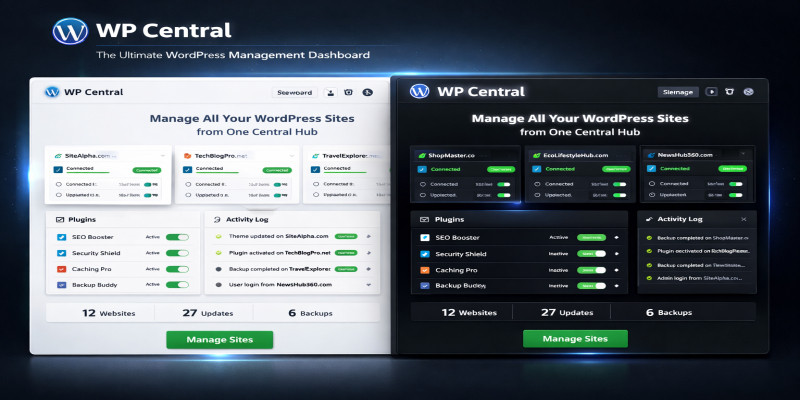
Screenshots

Overview
WP Central is a powerful WordPress plugin that lets you manage plugins
across unlimited WordPress websites from a single dashboard.
Features:
✔ Manage unlimited WordPress sites
✔ Activate / deactivate plugins remotely
✔ Secure API-based connection
✔ Connection status indicators
✔ Activity logs
✔ No third-party servers
✔ Ideal for developers and agencies
WP Central consists of:
• WP Central Manager (master plugin)
• WP Central Connector (child plugin)
Both plugins are included in the download.
Features
Manage unlimited WordPress sites
✔ Activate / deactivate plugins remotely
✔ Secure API-based connection
✔ Connection status indicators
✔ Activity logs
✔ No third-party servers
✔ Ideal for developers and agencies
WP Central consists of:
• WP Central Manager (master plugin)
• WP Central Connector (child plugin)
Both plugins are included in the download.
Requirements
WP Central works on standard WordPress hosting environments.
Minimum Requirements
- WordPress: 5.8 or higher
- PHP: 7.4 or higher
- MySQL: 5.6 or higher
- HTTPS: Recommended (for secure REST API communication)
Server Requirements
- WordPress REST API must be enabled (default in WordPress)
-
wp_remote_get()andwp_remote_post()functions enabled - Outgoing HTTP requests allowed by hosting
User Permissions
-
Administrator access on:
- Master site
- All child sites
Compatible Hosting
- Shared Hosting (Hostinger, Bluehost, GoDaddy, etc.)
- VPS / Cloud Hosting
- Managed WordPress Hosting
⚠️ No external services or third-party servers are required.
Instructions
WP Central consists of two plugins:
- WP Central Manager (Master Plugin)
- WP Central Connector (Child Plugin)
Both plugins are included in the download.
🔹 STEP 1: Install Master Plugin (Main Site)
- Login to WordPress Admin of your main site
- Go to Plugins → Add New → Upload Plugin
-
Upload
wp-central-manager-v1-4.zip - Click Install Now → Activate
- You will see WP Central in the WordPress admin menu
🔹 STEP 2: Install Child Plugin (Each Website)
Repeat these steps on every site you want to manage:
- Go to Plugins → Add New → Upload Plugin
-
Upload
wp-central-connector-v1-4.zip - Click Install Now → Activate
- Go to Settings → WP Central Connector
- Copy the generated API Key
⚠️ The API key is generated once and does not change unless the plugin is deleted.
🔹 STEP 3: Connect Child Site to Master
- Go to WP Central on the master site
-
Enter:
-
Child Site URL (example:
<a href="https://example.com">https://example.com</a>) - API Key copied from the child site
-
Child Site URL (example:
- Click Add / Update
If connected successfully, the site will show:
🟢 Connected
🔹 STEP 4: Manage Plugins
For each connected site, WP Central displays:
- Plugin Name
- Plugin Status (Active / Inactive)
- Action Button (Activate / Deactivate)
Available Actions
- Activate plugins remotely
- Deactivate plugins remotely
- View real-time connection status
- View activity logs
⚠️ The WP Central Connector plugin cannot be deactivated remotely for security reasons.
🔹 STEP 5: Connection Status
Each site shows a live connection status:
- 🟢 Connected – API key and REST API working
- 🔴 Disconnected – Invalid API key, REST blocked, or site unreachable
Disconnected sites do not show broken or empty tables.
🔹 STEP 6: Activity Logs
Navigate to:
WP Central → Activity Logs
The log records:
- Site URL
- Plugin activated/deactivated
- Action type
- Date and time
Useful for:
- Auditing
- Client reporting
- Troubleshooting
🔹 STEP 7: Reset All Data (Optional)
Location:
WP Central → Reset All Data
This will:
- Remove all connected sites
- Clear all activity logs
⚠️ This action is irreversible and requires confirmation.
🔒 SECURITY NOTES
- API key authentication is required for all actions
- Nonce verification is used on all admin actions
- No data is sent to third-party servers
- Connector plugin is protected from remote deactivation
❓ TROUBLESHOOTING
Site shows “Disconnected”
- Verify the API key
- Ensure REST API is not blocked by hosting or security plugins
- Confirm correct site URL (https vs http)
Plugins not loading
- Ensure connector plugin is active on child site
- Check administrator permissions
🧾 SUPPORT
For support, please contact the author through the marketplace where you purchased the plugin.
Other items by this author





| Category | Plugins / WordPress / Miscellaneous |
| First release | 2 February 2026 |
| Last update | 2 February 2026 |
| Supported CMS | WordPress 5.8, WordPress 5.9, WordPress 6.0, WordPress 6.1, WordPress 6.2, WordPress 6.3, WordPress 6.4, WordPress 6.5, WordPress 6.6, WordPress 6.7, WordPress 6.8 |
| Files included | .php, .css, .html, Javascript .js |
| Tags | wordpress dashboard, wordpress automation, wordpress maintenance, wordpress management, multiple wordpress sites, wp central, wordpress remote management, manage wordpress plugins, multisite manager, wordpress admin tool, remote plugin control, agency wordpress tool, wordpress site manager, plugin management, wp management system |









