Real Drum Android App Source CodeReal Drum Android App Source Code
Complete Real Drum Android app source code (Java) - 15 drum pads, SoundPool, beat recorder, AdMob, Google Play ready. Recently Updated
Real Drum Android App Source Code
Complete Real Drum Android app source code (Java) - 15 drum pads, SoundPool, beat recorder, AdMob...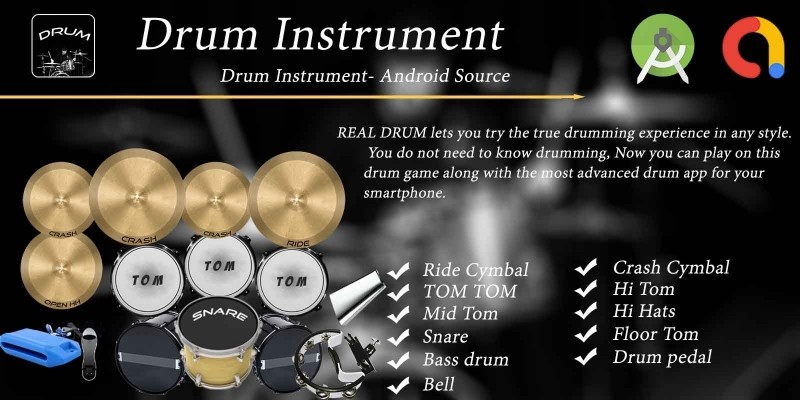
Screenshots
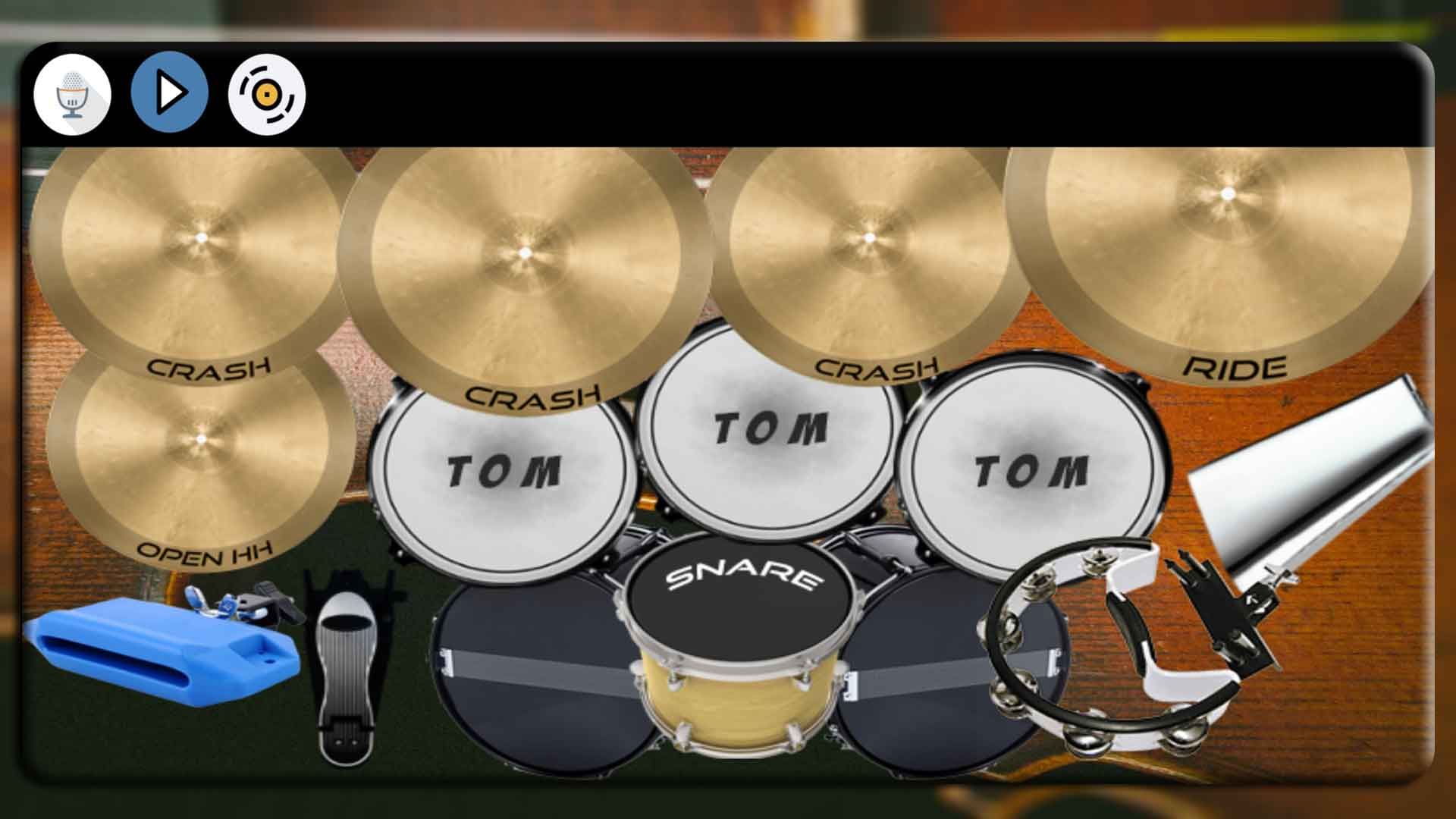
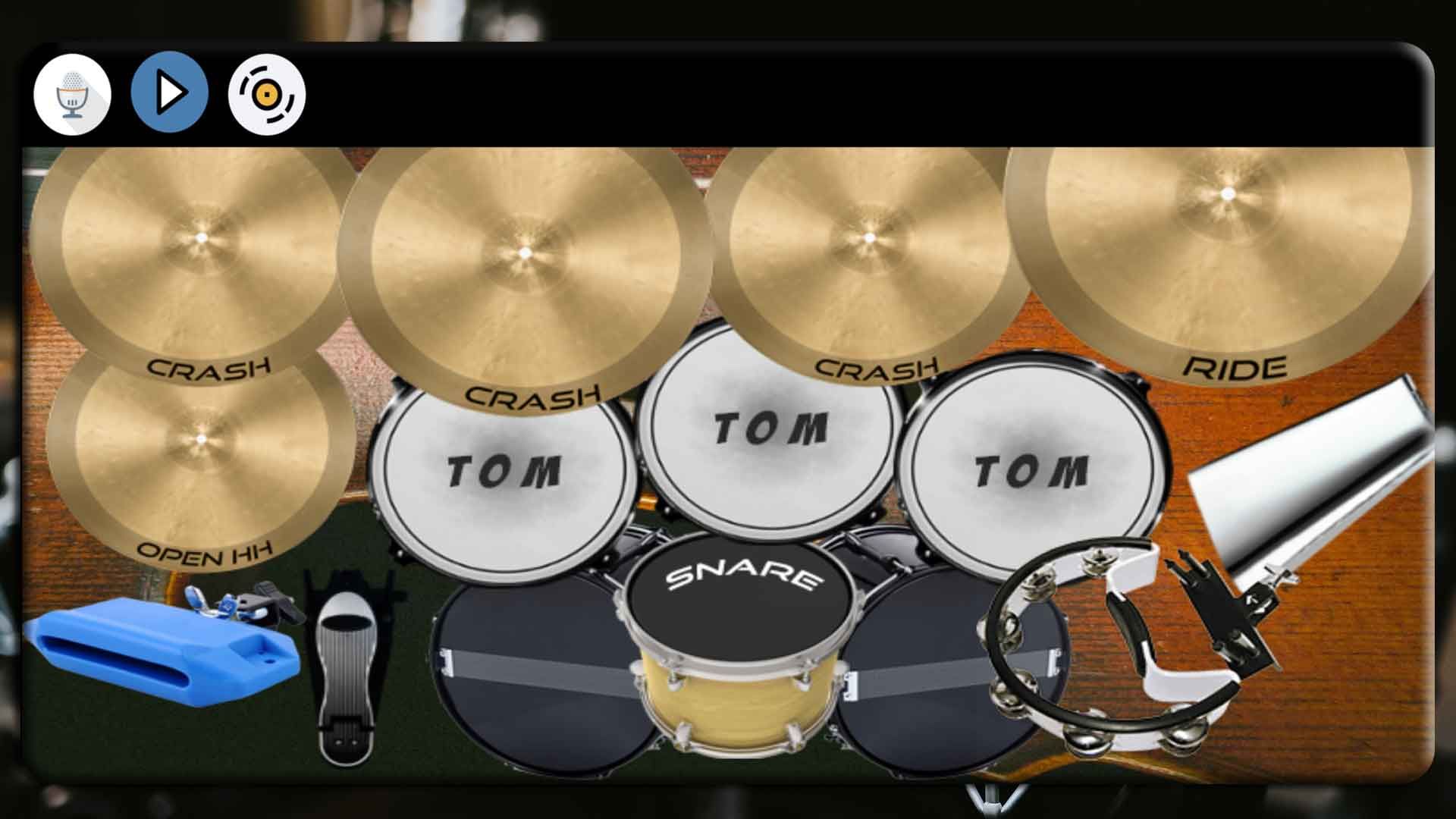
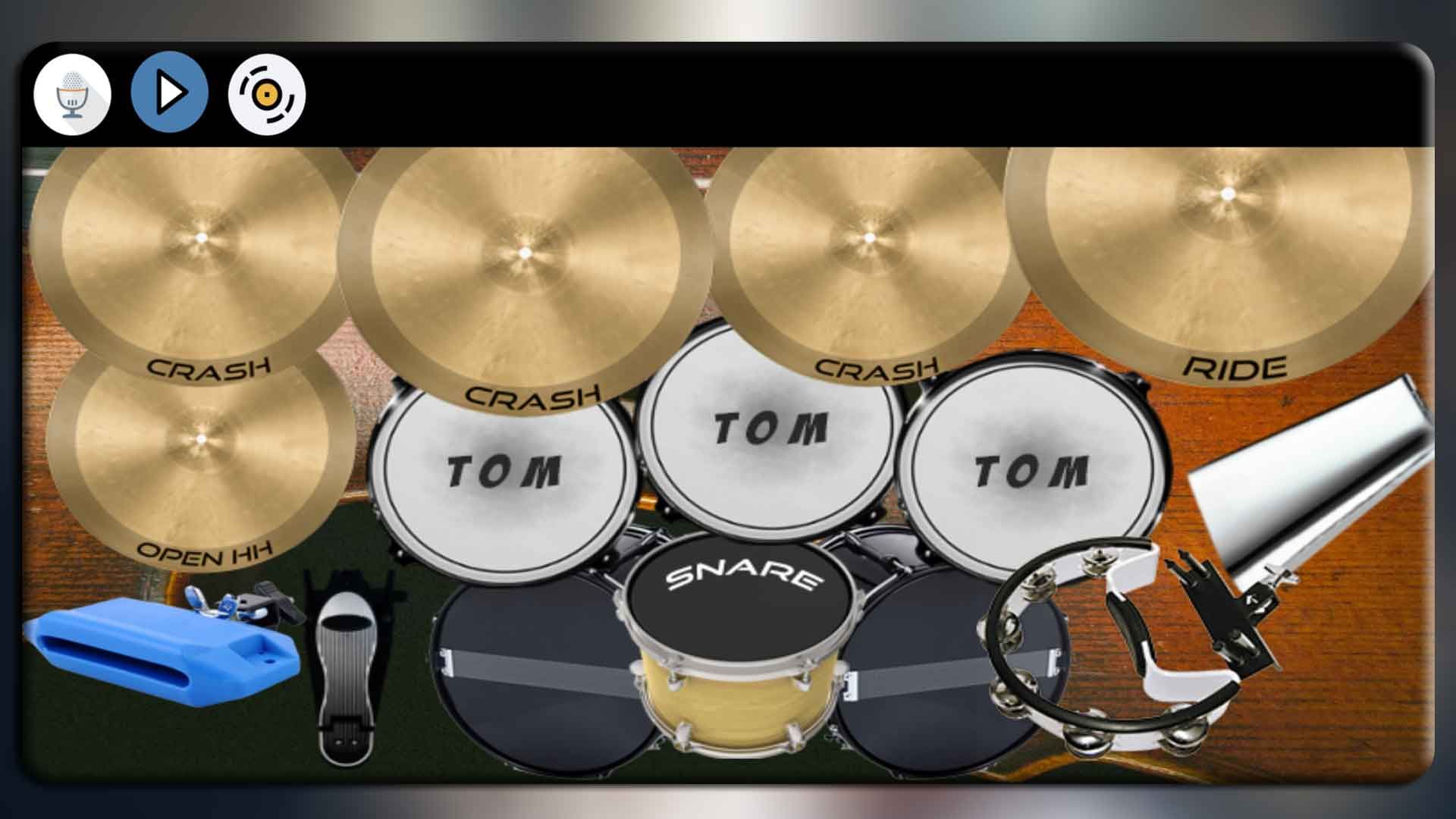
Overview
🥁 Real Drum - Virtual Drum Kit Android Source Code
Complete Java Android Studio project · 15 drum pads · Multi-touch · Low-latency SoundPool · Beat recorder & player · Background music jam mode · AdMob ready · Publish on Google Play in minutes
⬇️ Try the Live Demo APK Before You Buy
Install the demo APK on your Android phone or tablet, jam on the 15-pad drum kit, record a beat and play it back before purchasing the source code.
Tip: enable "Install unknown apps" for your browser on Android to install the APK file.
📖 About This Real Drum Android Source Code
Real Drum is a complete, ready-to-publish
virtual drum-kit Android source code written in Java using
Android Studio. The app delivers a full 15-pad drum kit -
snare, three toms, hi-hat (open + pedal), ride, bell, three crashes, left & right bass,
wood block and tambourine - powered by Android's low-latency SoundPool audio
engine for instant, multi-finger response. Every pad plays a quick scale animation when struck,
and the activity is locked to landscape for the optimal kit layout. Users can
toggle Record to capture a beat (every pad-hit + timestamp), save it under a
custom name as a .drm file in app-scoped storage, and play it back
later from a built-in dialog. A second feature lets the user pick any audio file from the
device's MediaStore and jam their drum part over the song - the album icon
rotates while the music plays. With AdMob banner + interstitial ads already
integrated, this is one of the fastest complete Android music apps to rebrand,
reskin and upload to Google Play.
What end-users get:
- 🥁 A satisfying full drum-kit experience that works fully offline.
- 🖐 True multi-touch - hit two (or more) pads at once with both hands.
- 🔴 A built-in beat recorder + player with named, re-playable recordings.
- 🎵 A jam-along music player that picks any song from the device.
✨ Key Features
| Feature | What It Does |
|---|---|
| 🥁 15 Playable Pads | Snare, tom 1/2/3, hi-hat (open + pedal), ride, bell, crash 1/2/3, left + right bass, wood block and tambourine - a complete kit. |
| ⚡ Low-Latency SoundPool | 12-stream SoundPool on STREAM_MUSIC - pads respond instantly with no perceptible delay. |
| 🖐 Multi-Touch Support | Handles ACTION_POINTER_DOWN so two-handed players can strike multiple pads simultaneously. |
| 🎬 Pad-Hit Animation | Every pad plays a quick scale/shake animation on hit (driven by res/anim/animation.xml) for a satisfying tactile feel. |
| 🔴 Beat Recorder | Toggle Record, play your beat, then save it with a custom name. The app captures every pad-hit + timestamp as a compact .drm file. |
| ▶️ Playback Your Recordings | A built-in dialog lists every saved recording - tap to play it back through the kit, with the original animations replayed in sync. |
| 🎵 Background Music Jam | Pick any audio file from device MediaStore and jam your drum part over it. Album icon rotates while music plays. |
| 📐 Density-Aware Layout | Every pad is positioned and scaled from an 800x480 reference grid against the real device width/height - fits 4" phones to 12" tablets cleanly. |
| 🚀 Splash Screen | Branded full-screen splash with a 2-second timer (tweakable) before redirecting to the drum kit. |
| 🖥 Locked Landscape | Both activities are locked to landscape for the optimal full-kit playing layout. |
| 💰 Google AdMob Integrated | Banner on the main drum screen + interstitial after the user saves a recording. Change all 3 ad IDs in a single XML file. |
| 🔐 Modern Permissions | Uses READ_MEDIA_AUDIO on Android 13+ and the granular ActivityResult launcher - clean Play data-safety declaration. |
| 📲 FileProvider Ready | FileProvider is wired up out of the box so you can add a "Share recording" button in minutes. |
| 🌍 Multi-Language Ready | All UI strings in strings.xml - add any language with a new values-xx/ folder. |
| ⚡ Easy Reskin | Change package name, app name, icon, AdMob IDs, theme colour, pad PNGs and drum samples in under an hour. |
| 📚 Detailed Documentation | Step-by-step README.md plus inline // RESKIN: code comments showing exactly what to change for a custom build. |
🕹️ How the App Works for the End User
- Open the app - the branded splash screen appears for 2 seconds.
- The full landscape drum kit loads with 15 pads laid out in a realistic kit arrangement.
- Tap any pad to hear the sample and see the pad shake. Use multiple fingers to strike chords (e.g. crash + snare + bass together).
- Toggle the Record button on, play your beat, then toggle it off - a "Save as" dialog asks for a name.
- Tap the Play button to open a list of every recording you've saved. Tap one to play it back through the kit (animations included).
- Tap the rotating album icon to pick a song from the device's audio library and jam your drum part over it.
🛠️ Technical Specifications
- Programming Language: Java 11
- IDE: Android Studio Ladybug (2024.2) or newer
- Build System: Gradle 9.4 · AGP 9.x · Version Catalog (
gradle/libs.versions.toml) - compileSdk / targetSdk: 37 (latest)
- minSdk: 24 (Android 7.0+) - covers ~98% of active Android devices
- UI: AndroidX AppCompat, Material, MultiDex
- Audio engine: Android
SoundPool(12-stream pool, STREAM_MUSIC) - Background music: Android
MediaPlayer(data source = pickedMediaStorepath) - Music picker:
MediaStore.Audio.Media+ custom list dialog - Layout helper:
sdp-android(scalable dp) - Permissions: RECORD_AUDIO, MODIFY_AUDIO_SETTINGS, READ_MEDIA_AUDIO (13+), legacy storage on older OS only
- Storage: App-scoped
getExternalFilesDir("Audiobooks")/<app_name>/ - ABI splits: armeabi-v7a, arm64-v8a, x86, x86_64
- Backend: None - 100% offline app
- Monetisation: Google AdMob (banner + interstitial, Mobile Ads SDK 23.x)
- Output: APK and AAB (Android App Bundle) ready for Google Play
📦 What You Get In This Package
- ✅ Full Android Studio project with complete Java source code.
- ✅ All resources included: launcher icons (6 densities), pad PNGs in
assets/drumicons/, 14 drum.oggsamples inres/raw/, layouts, themes and colour palette. - ✅ Working 15-pad multi-touch drum kit with low-latency
SoundPoolplayback. - ✅ Working beat recorder + player (
.drmline-based format, app-scoped storage). - ✅ Working background music jam mode with
MediaStorepicker. - ✅ Working AdMob banner + interstitial integration (Google Mobile Ads SDK 23.x).
- ✅ Working FileProvider already configured for easy "Share recording" extension.
- ✅ Detailed README.md with rebrand, reskin and Google Play publish guide.
- ✅ Inline // RESKIN: code comments showing exactly where to change AdMob IDs, package name, app name, theme colour, pad PNGs, drum samples, pad positions and save folder.
- ✅ Free future bug fixes.
⚡ Reskin & Publish on Google Play in Under an Hour
You can launch your own branded drum-kit app on Google Play very quickly:
- Open the project in Android Studio & let Gradle sync.
- Change the package name &
applicationIdinapp/build.gradle(Refactor → Rename). - Replace the launcher icon via Image Asset Studio and the splash background in
res/layout/splash_screen.xml. - Re-colour the theme from
res/values/colors.xml-colorPrimarydrives the toolbar in one shot. - (Optional) Replace the drum-pad PNGs in
app/src/main/assets/drumicons/(bass, snare, tom, hihat, ride, crash, bell, block, tambourine - 12 PNGs). - (Optional) Replace the drum samples by dropping new
.oggfiles with the same names intores/raw/. - (Optional) Move / resize any pad by editing its
<name>X/<name>Yreference coordinates near the top ofDrumMainActivity.java(all marked// RESKIN:) - they're scaled against an 800x480 grid. - Edit 3 strings in
res/values/strings.xmlto set your own AdMob App ID, Banner ID and Interstitial ID. - Generate a signed AAB and upload to Google Play Console.
💡 No advanced coding required for the basic rebrand - everything important lives in resource files and is clearly marked with // RESKIN: comments in code. Just search the project for RESKIN to jump to every touch-point.
🎯 Perfect For
- Indie Android developers who want a complete virtual drum-kit source code.
- App resellers and reskin agencies who need a quick Google Play launch.
- Music teachers / educators building a kit-explorer app for students.
- Hobby musicians who want to practise grooves on a phone or tablet - and ship their own branded version.
- Kids' music apps - swap the samples for animal sounds, percussion toys, etc.
- Beginners learning Android Studio with a real-world Java music app project (SoundPool, MediaPlayer, multi-touch, animation, ActivityResult API).
- Educators teaching Android, low-latency audio, AdMob integration, modern runtime permissions and MediaStore.
📋 Requirements
- Android Studio Ladybug (2024.2) or newer
- JDK 17+ (auto-provisioned by Android Studio / Gradle)
- Android SDK 37 installed
- A test device or emulator running Android 7.0+ (API 24+)
- An AdMob account for ad monetisation (optional)
🏷️ Tags
android source code, real drum android, virtual drum kit, drum pad app, drum kit source code, soundpool android, music app android, beat maker android, drum recorder app, android studio project, java drum app, complete android app, reskin android app, admob integrated app, android music template, google play ready, offline android app, multi touch android, media store picker android.
💬 Support
Need help with rebranding, publishing or adding a new feature (e.g. share-recording-as-audio, in-app purchase to unlock extra kits, metronome, BPM detection)? Send us a message and we will be happy to help. Free updates and bug fixes are included.
Launch Your Own Drum Kit App Today 🚀
Buy once, brand it, publish it on Google Play. No subscriptions, no hidden costs.
Android, Google Play, AdMob and the Android robot are trademarks of Google LLC.
Features
- Ride Cymbal
- Crash Cymbal 1
- Crash Cymbal 2
- Crash Cymbal 3
- Hi Hat (Open)
- Hi Hat (Pedal)
- Snare Drum
- Hi Tom
- Mid Tom
- Floor Tom
- Left Bass Drum
- Right Bass Drum
- Bell / Cowbell
- Wood Block
- Tambourine
- 15 Playable Drum Pads
- Low-Latency SoundPool Audio Engine
- Multi-Touch Support (Play With Both Hands)
- Pad-Hit Shake Animation
- Beat Recorder (Save Your Own Beats)
- Beat Playback (Re-Play Saved Recordings)
- Background Music Jam Mode (Play Over Any Song)
- MediaStore Music Picker
- Branded Splash Screen
- Locked Landscape Orientation
- Density-Aware Layout (Phones & Tablets)
- Google AdMob Banner Ads
- Google AdMob Interstitial Ads
- Modern Runtime Permissions (Android 13+ Ready)
- App-Scoped Storage (No Storage Permission Required)
- FileProvider Configured (Easy Share Extension)
- Multi-Language Ready (strings.xml)
- Easy Reskin (// RESKIN code comments)
- Detailed README.md Documentation
- Android Studio Project (Java 11)
- Gradle 9.x + Version Catalog
- minSdk 24 / targetSdk 37 (Android 7.0 to 14+)
- APK & AAB Ready for Google Play
Requirements
📋 Requirements to Setup This Project
- Android Studio Ladybug (2024.2) or newer
- JDK 17 or higher (auto-provisioned by Android Studio / Gradle)
- Gradle 9.4+ (bundled via Gradle Wrapper - no manual install needed)
- Android Gradle Plugin (AGP) 9.x
- Android SDK Platform 37 installed (via SDK Manager)
- Android SDK Build-Tools 35.0.0 or newer
- Android SDK Platform-Tools (latest)
- Java 11 language level support
- Internet connection (for first-time Gradle sync to download dependencies)
- Minimum 8 GB RAM recommended for Android Studio
- At least 10 GB free disk space (SDK + Gradle cache + project)
- Windows 10/11, macOS 12+ or any modern Linux distribution
- A physical Android device (Android 7.0 / API 24 or higher) OR an Android Emulator (API 24+)
- USB cable + USB debugging enabled on the device (for real-device testing)
- A Google AdMob account (free) - for replacing the test ad IDs with your own
- A Google Play Console developer account ($25 one-time fee) - required to publish on the Play Store
- An app signing keystore (.jks file) - generate with
keytoolfor signed release builds - Basic knowledge of Android Studio (open project, Gradle sync, run on device)
Instructions
🛠️ Setup & Installation Instructions
- Download & Extract – Unzip the purchased package to any folder on your computer.
- Install Android Studio – Download the latest Android Studio (Ladybug 2024.2 or newer) from
developer.android.com/studioand install it. - Install JDK 17 – Android Studio auto-installs JDK 17. Verify under File → Settings → Build, Execution, Deployment → Build Tools → Gradle → Gradle JDK.
- Install SDK Platform 37 – Open Tools → SDK Manager, tick Android 15 (API 37) and Android SDK Build-Tools 35.0.0+, then click Apply.
- Open the Project – Launch Android Studio → File → Open → select the unzipped
realdrumandroidfolder → click OK. - Trust & Sync Gradle – When prompted, click Trust Project. Wait for Gradle to download dependencies (first sync takes 3–10 minutes depending on internet speed).
- Fix Any SDK Path Issues – If you see an SDK location error, edit
local.propertiesand setsdk.dir=/path/to/your/Android/Sdk. - Change Package Name – In the Project pane, right-click the package
com.codsterdrum.drum→ Refactor → Rename → enter your own package (e.g.com.yourbrand.drum). Also updateapplicationIdinapp/build.gradle. - Update App Name & AdMob IDs – Open
app/src/main/res/values/strings.xmland replaceapp_name,admob_app_id,app_bannerandapp_fullscreenwith your own values. - Replace Launcher Icon – Right-click
app/src/main/res→ New → Image Asset → select your icon → Finish. - (Optional) Replace Drum PNGs – Drop new PNGs into
app/src/main/assets/drumicons/using the same file names. - (Optional) Replace Drum Sounds – Drop new
.oggfiles intoapp/src/main/res/raw/using the same file names. - Connect a Device or Emulator – Enable Developer Options + USB Debugging on a real Android 7.0+ device, or create an emulator via Tools → Device Manager.
- Run the App – Press the green ▶ Run button (or Shift+F10). The app installs and launches automatically.
- Generate Signed Release Build – Go to Build → Generate Signed Bundle / APK → Android App Bundle, create or select a keystore, choose
releaseand click Finish. The signed.aabis written toapp/release/. - Upload to Google Play – Sign in to
play.google.com/console, create a new app, upload the.aab, complete the store listing, content rating and data-safety form, then submit for review. - Done 🎉 – Your own branded Real Drum app is live on Google Play!
💡 Tip: Search the entire project for the keyword RESKIN – every file, class and resource you may need to edit for a custom build is clearly marked.
Other items by this author










|
Android App Reskin Service
Have your App reskinned to meet your needs.
|
$199 | Buy now |
| Category | App Templates / Android / Applications / Music |
| First release | 29 June 2020 |
| Last update | 18 May 2026 |
| Operating Systems | Android 7.0, Android 8.0, Android 9.0, Android 10.0, Android 11.0, Android 12.0, Android 4.0, Android 5.0, Android 6.0 |
| Files included | .html, .apk, .java, .xml |
| Tags | android, Java, source code, admob, reskin, android studio, drum, music app, drum pad, beat maker, real drum, drum kit, virtual drum, soundpool, drum recorder |