Android FM With Live Video StreamAndroid FM With Live Video Stream
Single station FM radio app: live audio & video streaming. Jetpack Compose, production-ready, AdMob/Meta/Unity ads.
Android FM With Live Video Stream
Single station FM radio app: live audio & video streaming. Jetpack Compose, production-ready,...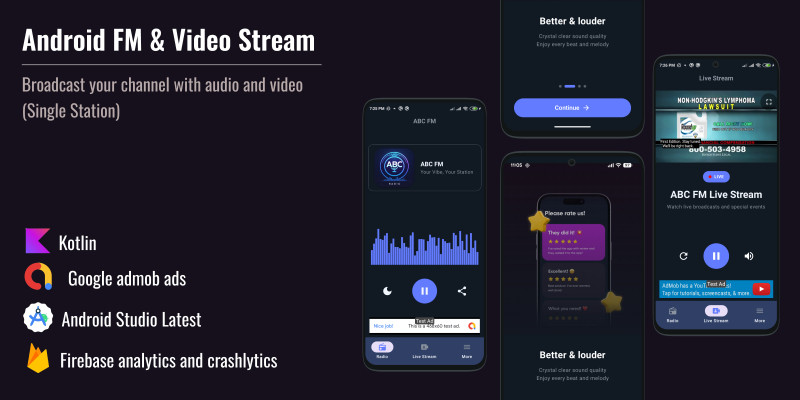
Screenshots




Overview
ABC FM Radio - Single Station Radio FM App with Live Audio & Video Streaming


Description
ABC FM Radio is a single station Radio FM app - a professional live streaming application that delivers real-time audio and video broadcasting to Android devices. Built with modern Jetpack Compose and proven monetization strategies, this single station Radio FM app enables users to listen to live radio broadcasts from one dedicated station and watch live video streams in real-time.
This production-ready single station Radio FM app is perfect for radio stations, broadcasters, content creators, and media companies looking to launch a branded single station live streaming mobile application. The app specializes in live streaming technology - delivering real-time audio and video content from ABC FM Radio broadcasts to Android devices.
Key Highlights
- Single Station Focus: Dedicated to one Radio FM station - uninterrupted live audio and video streaming
- Dual Live Streaming: Simultaneous access to live audio and live video broadcasting
- Real-Time Connection: Direct connection to live broadcast feeds for immediate streaming
- Production Ready: Complete app with all features implemented, tested, and optimized for Google Play Store submission
- Modern Technology: Built with latest Jetpack Compose, Kotlin, and industry-standard MVVM architecture
- Monetization Ready: Advertising-based revenue model with support for multiple ad networks
Live Streaming Capabilities:
- Live Audio Broadcasting: Stream real-time radio broadcasts - listen to live content as it happens
- Live Video Broadcasting: Watch real-time video streams - view live broadcasts instantly
- Continuous Live Feeds: Uninterrupted live streaming experience with automatic reconnection
- Professional Live Platform: Production-ready live streaming solution for broadcasters
This single station Radio FM app works immediately with just your stream URLs! Ad networks and Firebase are only required for monetization and analytics. Please review each provider's pricing before deployment.
Perfect For:
- Radio Stations: Launch your own branded single station Radio FM app with live streaming
- Broadcasters: Professional live streaming solution for real-time audio and video content
- Content Creators: Background live audio and live video streaming capabilities
- Media Companies: Professional live streaming solution for broadcasts
- Android Developers: Ready-to-launch app with modern architecture
- Entrepreneurs: Proven business model with advertising revenue
- Agencies: White-label solution for clients
- Startups: Enter the radio and video streaming app market
Why Choose This App?
Production Ready: Complete ABC FM Radio single station Radio FM app with all features implemented, tested, and optimized for Google Play Store submission. No additional development needed - just configure your live stream URLs and launch your single station Radio FM app!
Proven Revenue Model: Advertising-based monetization strategy with support for multiple ad networks. Start earning revenue immediately after launch with live streaming content.
Modern Live Streaming Technology: Built with latest Jetpack Compose, Kotlin, and industry-standard architecture. Professional live streaming codebase optimized for real-time audio and video broadcasting.
Dual Live Streaming: ABC FM Radio single station Radio FM app offers unique combination of live audio streaming and live video streaming in one app. Real-time broadcasting capabilities for both audio and video content from your single Radio FM station. Stand out from competitors with this powerful single station live streaming feature set.
Features
ABC FM Radio - Features
Live Audio Streaming Features
- Live Audio Streaming: Real-time radio broadcasting with ExoPlayer (Media3) - stream live audio as it happens
- Single Station Focus: Dedicated to one Radio FM station - uninterrupted live audio streaming
- Background Live Playback: Continue listening to live broadcasts in background with foreground service
- Live Stream Controls: Media controls in notification and lock screen for live audio
- Optimized Live Streaming: Smooth real-time audio streaming with advanced buffering for live content
- Real-Time Connection: Automatic reconnection to maintain live stream continuity
Live Video Streaming Features
- Live Video Streaming: Real-time video broadcasting support (HLS/M3U8 format) - watch live video as it broadcasts
- Full-Screen Live Player: Immersive full-screen video player with controls for live broadcasts
- Seamless Live Switching: Instant switching between live audio and live video streams
- Optimized Live Performance: High-performance video playback optimized for live streaming
- Live Background Audio: Continue live audio playback while viewing live video
- Real-Time Video Feed: Stream live video content directly from broadcast source
Advanced Features
- Live Stream Sleep Timer: Sleep timer functionality (15, 30, 45, 60, 90 minutes) for live audio
- Live Audio Visualizer: Real-time audio visualizer with animated bars showing live stream activity
- Share Live Streams: Share functionality for live stream information
- Real-Time Status: Live connection status and stream quality indicators
- Continuous Live Feeds: Uninterrupted live streaming experience with automatic reconnection
- Dual Live Streaming: Simultaneous access to live audio and live video broadcasting
Monetization Features
- Multiple Ad Network Support: Google AdMob, Meta (Facebook) Ads, and Unity Ads integration
- Banner Ads: Continuous revenue at bottom of screens during live streams
- Interstitial Ads: Full-screen ads between live streaming actions
- Easy Switching: Simple configuration to switch between ad networks
- Optimized Placement: Strategic ad positioning for maximum revenue during live broadcasts
- Analytics Ready: Track live stream engagement and revenue with Firebase Analytics
- Ad-Supported Model: Revenue from ad impressions during live streams
- Free Live Access: Full access to live audio and live video streaming
User Interface Features
- Modern Jetpack Compose Design: Beautiful native interface with Material Design 3 components
- Dark Theme: Beautiful gradient designs with intuitive user experience
- Smooth Animations: Responsive layout for all screen sizes
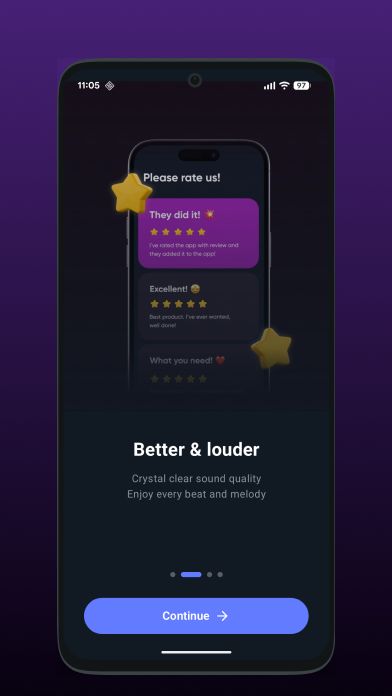
- Beautiful Onboarding: Welcome screens explaining live streaming features
- Settings Screen: Complete settings with website links, privacy policy, terms of use, and social media integration
- Bottom Navigation: Easy switching between Live Audio, Live Video, and Settings
- Intuitive UX: Smooth animations and responsive design
Technical Features
- MVVM Architecture: Clean architecture pattern with Hilt dependency injection
- Foreground Service: Background live audio streaming capability
- Media Session: Lock screen and notification controls for live streams
- Memory Optimization: Performance tuned for smooth live streaming
- Network State Handling: Automatic reconnection to live streams on network changes
- Live Stream Buffering: Advanced buffering for uninterrupted live content
- Real-Time Quality Adaptation: Adaptive streaming for optimal live playback
- Firebase Integration: Analytics and Crashlytics for monitoring and crash reporting
- SharedPreferences: Local storage for settings and user preferences
App Structure & Screens
- Onboarding: Beautiful welcome screens explaining live streaming features
- Live Audio Player: Main live audio streaming interface with controls
- Live Video Stream: Live video streaming interface with full-screen player
- Settings: Complete settings screen with links and information
- Bottom Navigation: Easy switching between Live Audio, Live Video, and Settings
Live Streaming Functionality
Live Audio Streaming Process
- Beautiful onboarding screens for first-time users
- Main interface with live streaming controls
- ExoPlayer connects to live audio broadcast URL in real-time
- Play, pause live stream, sleep timer, share live broadcast
- Continue listening to live audio stream with notification controls
- Continuous live audio feed from broadcast source
Live Video Streaming Process
- Switch to live video streaming interface
- App connects to live video broadcast stream URL
- Full-screen live video player with real-time controls
- Smooth transition between live audio and live video streams
- Continuous live video streaming from broadcast source
Requirements
ABC FM Radio - Requirements
Live Streaming Requirements
ABC FM Radio delivers real-time live audio and video streaming:
- Live Audio Stream URL: Your real-time radio broadcasting stream URL (FREE - No API key required)
- Live Video Stream URL: Your live video broadcasting stream URL (HLS/M3U8 format supported)
- AdMob/Meta/Unity: For advertising revenue (free with revenue sharing)
- Firebase: For analytics and crash reporting (optional but recommended)
Note: ABC FM Radio is a single station Radio FM app - a live streaming application that broadcasts real-time audio and video content from one dedicated radio station. The app streams live audio from your single radio station and live video from your broadcast feed. This single station Radio FM app works immediately with just your stream URLs! Ad networks and Firebase are only required for monetization and analytics. Please review each provider's pricing before deployment.
Device Compatibility
Supported Devices:
- Android Versions: Android 7.0 (Nougat) or later
- Android Phones: All devices running Android 7.0+
- Android Tablets: All tablets running Android 7.0+
- Minimum RAM: 2GB recommended for smooth playback
Development Requirements
- Android Studio: Latest version (Hedgehog or newer)
- Operating System: Windows 10+, macOS 10.14+, or Linux
- Kotlin: 1.9+
- JDK: 11 or higher
Required Accounts (for deployment)
- Google Play Developer: $25 one-time fee - For Play Store distribution
- Live Audio Stream URL: FREE - Your real-time radio broadcasting URL
- Live Video Stream URL: FREE - Your real-time video broadcasting URL
- AdMob/Meta/Unity: FREE - For advertising revenue (revenue sharing model)
- Firebase: FREE - For analytics and crash reporting (optional but recommended)
Technical Dependencies
Framework & Architecture
- Jetpack Compose - Modern declarative UI framework
- MVVM Architecture - Clean architecture pattern
- Kotlin - Modern Android development language
- Android 7.0+ (API 24+) - Wide device compatibility
Key Dependencies
- ExoPlayer (Media3) - Professional live audio/video streaming engine for real-time broadcasts
- Hilt - Dependency injection framework
- Retrofit - HTTP client for API calls
- Google AdMob - Advertisement integration
- Meta Ads SDK - Facebook advertising
- Unity Ads SDK - Unity advertising platform
- Firebase Analytics - Live stream usage tracking
- Firebase Crashlytics - Crash reporting and monitoring
- Coil - Image loading library
- Lottie - Animation support
Live Streaming Technical Features
- Foreground Service - Background live audio streaming
- Media Session - Lock screen and notification controls for live streams
- SharedPreferences - Local storage for settings
- Memory Optimization - Performance tuned for smooth live streaming
- Network State Handling - Automatic reconnection to live streams on network changes
- Live Stream Buffering - Advanced buffering for uninterrupted live content
- Real-Time Quality Adaptation - Adaptive streaming for optimal live playback
Stream Format Requirements
- Audio Stream: Standard audio streaming formats (MP3, AAC, etc.)
- Video Stream: HLS/M3U8 format for live video broadcasting
- Stream URLs: Publicly accessible streaming URLs
- Network: Stable internet connection for live streaming
Minimum System Requirements
- Android Version: Android 7.0 (API level 24) or higher
- RAM: 2GB minimum (4GB recommended for optimal performance)
- Storage: 50MB for app installation
- Network: Stable internet connection (Wi-Fi or mobile data)
- Permissions: Internet access, Network state, Wake lock, Foreground service
Instructions
ABC FM Radio - Setup Instructions
Quick Setup Overview
Estimated Setup Time: 2-3 hours
Setup Steps
Step 1: Configure Stream URLs
- Open the Android Studio project
- Navigate to
AppConstants.ktfile in your project - Configure live audio stream URL for real-time radio broadcasting:
- Replace the placeholder with your actual radio stream URL
- Ensure the URL is publicly accessible
- Test the URL in a browser or media player before adding
- Configure live video stream URL (HLS/M3U8 format) for video broadcasting:
- Replace the placeholder with your actual video stream URL
- Ensure the format is HLS/M3U8 compatible
- Test the URL before adding
Step 2: Update App Identity
- Update Package Name:
- Open
build.gradle.ktsin the app module - Update
applicationIdto your desired package name - Example:
applicationId = "com.yourcompany.yourapp"
- Open
- Update App Name:
- Open
strings.xmlin res/values folder - Update
app_nameto your radio station name
- Open
- Replace App Icons:
- Replace icons in
res/mipmap-*folders with your branding - All required sizes are included in the project structure
- Use Android Studio's Image Asset Studio for easy icon generation
- Replace icons in
Step 3: Set Up Ad Network (Choose One)
Option A: Google AdMob
- Create an AdMob account at admob.google.com
- Create a new app in AdMob dashboard
- Get your App ID and create ad unit IDs (banner and interstitial)
- Open
AppConstants.ktand configure:- AdMob App ID
- Banner Ad Unit ID
- Interstitial Ad Unit ID
- Follow the monetization setup guide included in documentation
Option B: Meta (Facebook) Ads
- Create a Meta Business account
- Set up Facebook Audience Network
- Get your placement IDs
- Configure placement IDs in
AppConstants.kt - Follow the monetization setup guide included in documentation
Option C: Unity Ads
- Create a Unity account
- Create a new project in Unity Ads dashboard
- Get your Game ID and placement IDs
- Configure Game ID and placement IDs in
AppConstants.kt - Follow the monetization setup guide included in documentation
Step 4: Configure Firebase (Optional but Recommended)
- Create a Firebase project at console.firebase.google.com
- Add your Android app to the Firebase project:
- Use your package name (from Step 2)
- Download
google-services.jsonfile
- Place
google-services.jsonin theapp/directory - Enable Firebase Analytics in Firebase Console
- Enable Firebase Crashlytics in Firebase Console
- Follow Firebase setup instructions included in documentation
Step 5: Customize App Content
- Update Onboarding Screens:
- Modify onboarding content in the onboarding composable files
- Update images and text to match your branding
- Configure Settings Screen:
- Update website links
- Add social media links (Facebook, Instagram, TikTok)
- Add privacy policy URL
- Add terms of use URL
- Update Color Schemes:
- Modify color values in theme files
- Update gradient designs to match your branding
Step 6: Test Application
- Test on Emulator or Device:
- Connect Android device or start emulator
- Build and run the app
- Verify Functionality:
- Test live audio streaming - verify playback works correctly
- Test live video streaming - verify video playback works
- Test background playback - minimize app and verify audio continues
- Test sleep timer functionality
- Test media controls in notification and lock screen
- Test ad integration (if configured)
- Test all navigation and user interactions
- Test network reconnection when connection is lost
Step 7: Build Release Version
- Create Keystore (if not using provided one):
- Use Android Studio's Build → Generate Signed Bundle/APK
- Or use the provided keystore file with credentials from documentation
- Configure Signing:
- Add keystore configuration to
build.gradle.kts - Store credentials securely (never commit to version control)
- Add keystore configuration to
- Build Release AAB:
- Select Build → Generate Signed Bundle/APK
- Choose Android App Bundle (AAB) format
- Select release build variant
- Follow Google Play Store signing requirements
Step 8: Submit to Google Play Store
- Create Google Play Developer Account:
- Sign up at play.google.com/console
- Pay one-time $25 registration fee
- Prepare App Listing:
- Prepare app description
- Create screenshots (all required sizes)
- Create feature graphics
- Write privacy policy (templates included)
- Write terms of service (templates included)
- Upload App:
- Create new app in Google Play Console
- Upload your signed AAB file
- Complete store listing information
- Fill in all required fields
- Submit for Review:
- Review all information
- Submit app for Google Play review
- Wait for approval (typically 1-3 days)
App Structure & Screens
- Onboarding: Beautiful welcome screens explaining live streaming features
- Live Audio Player: Main live audio streaming interface with controls
- Live Video Stream: Live video streaming interface with full-screen player
- Settings: Complete settings screen with links and information
- Bottom Navigation: Easy switching between Live Audio, Live Video, and Settings
What's Included in the Package
Source Code
- Complete Android Studio project
- All Kotlin/Jetpack Compose files
- Resource files (images, strings, themes)
- Modular, well-documented code
- MVVM architecture implementation
Documentation
- 1000+ line comprehensive setup guide
- API configuration instructions
- Monetization setup guide
- Customization documentation
- Step-by-step beginner-friendly tutorials
Assets & Resources
- App icons (all required sizes)
- Screenshots for Google Play Store
- Color schemes & themes
- Launch screen assets
- Onboarding screen resources
Configuration
- Ad network configuration templates
- Firebase setup instructions
- Privacy policy templates
- Terms of service templates
- Google Play Store ready setup
Important Notes
- The app works immediately with just your stream URLs - no API keys required for basic functionality
- Ad networks and Firebase are only required for monetization and analytics
- Please review each provider's pricing before deployment
- All features are production-ready and tested
- Comprehensive documentation is included for easy setup
- The app follows Google Play Store guidelines and best practices
- Never commit sensitive information (API keys, keystore passwords) to version control
- Test thoroughly on multiple devices and Android versions before release
Version Information
Version 1.0.0 - Initial Release
- Live audio streaming with ExoPlayer (Media3) - real-time radio broadcasting
- Live video stream support (HLS/M3U8 format) - real-time video broadcasting
- Sleep timer functionality (15, 30, 45, 60, 90 minutes) for live streams
- Media controls in notification and lock screen for live broadcasts
- Background live audio playback with foreground service
- Multiple ad network support (AdMob, Meta, Unity)
- Firebase Analytics & Crashlytics integration
- Beautiful onboarding screens
- Modern Jetpack Compose UI with dark theme
- Settings screen with links and social media
- Comprehensive documentation & Google Play-ready package
- MVVM architecture with Hilt dependency injection


|
Android App Reskin Service
Have your App reskinned to meet your needs.
|
$499 | Buy now |
| Category | App Templates / Android / Applications / Video |
| First release | 7 February 2026 |
| Last update | 7 February 2026 |
| Operating Systems | Android 7.0, Android 8.0, Android 9.0, Android 10.0, Android 11.0, Android 12.0 |
| Files included | .apk, .java, .xml, build.settings |
| Tags | android, admob, monetization, radio, video streaming, live streaming, firebase, single station, kotlin, fm radio, jetpack compose, exoplayer, audio streaming, background playback, production ready |