Voice Reader - Flutter ApplicationVoice Reader - Flutter Application
AI Voice Reader: Listen to PDFs in 8+ Languages. Secure Vault & Ads-Free Reading.
Voice Reader - Flutter Application
AI Voice Reader: Listen to PDFs in 8+ Languages. Secure Vault & Ads-Free Reading.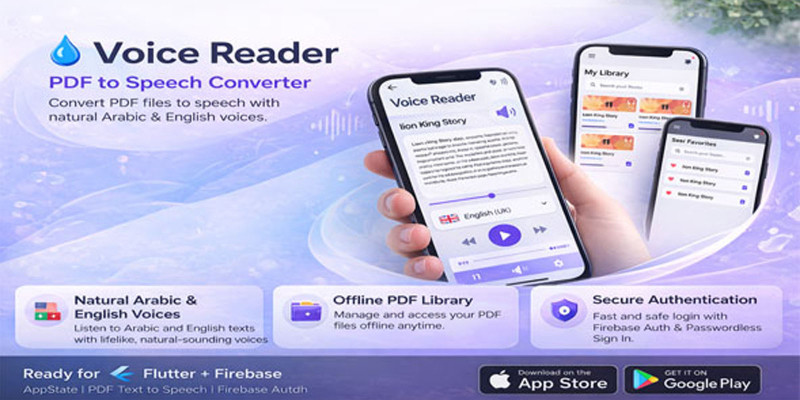
Screenshots

Overview
Voice Reader Pro – Complete Project Documentation
1. 🚀 Introduction
Welcome to the Voice Reader Pro documentation. This application is a high-performance PDF Text-to-Speech (TTS) solution built with Flutter. It is a production-ready asset currently live and performing on the Google Play Store.
2. ⚖️ License & Ownership
- Non-Exclusive License: The original developer retains all intellectual property rights. This purchase grants you a license to launch your own version.
- Personal Use Only: Re-selling or distributing the source code on any marketplace is strictly prohibited.
- Store Compliance: To avoid "Repetitive Content" violations, you must make significant changes to the UI and branding before uploading to Google Play or Apple App Store.
3. 🛠️ Mandatory Customization (Compliance Guide)
To ensure a unique product identity, you must:
- Visual Identity: Update the primary color palette, fonts, and splash screen.
- Branding: Set a unique App Name and a new Package Name (Bundle ID).
- UI Overhaul: Modify at least 30-40% of the interface to create a distinct user experience.
4. ☁️ Backend & Monetization Setup
- Firebase Integration: Connect your own Firebase project (Authentication & Database) using
google-services.jsonandGoogleService-Info.plist. - Google AdMob: The app is pre-configured for revenue. Simply replace the existing Ad Unit IDs with your own to start earning immediately.
5. 🎧 Application Workflow
- High-Fidelity TTS: Supports 8 languages with natural AI voices.
- ###b/b### Documents are stored in a private library, keeping the device storage clean.
- Internal Security: Users can set a private passcode for sensitive files.
- Background Listening: Seamless multitasking while listening to documents.
📌 Summary for the Buyer
"You are acquiring a proven, income-generating asset. Your journey starts by customizing the branding, linking your Firebase, and deploying your own version of this successful app."
Features
Key Features & Functionalities
🎙️ Advanced Audio & Reading
- Multilingual High-Fidelity TTS: Supports 8 global languages with advanced AI-powered, natural-sounding voices (Male & Female options) for an immersive listening experience.
- Instant PDF-to-Speech Engine: No waiting for tedious file conversions. The app processes and reads PDF documents in real-time directly within the interface.
- Background Audio Playback: Fully optimized for multitasking. Users can listen to their documents while using other apps or even when the screen is locked.
🔒 Privacy & Security
- Encrypted Secure Vault: A built-in private library protected by a Passcode Lock. Users can hide sensitive documents and reading history from unauthorized access.
- Privacy-Centric Architecture: Files are handled within a secure internal environment, ensuring user data and documents remain 100% private and protected.
📁 Smart Management & UX
- Smart Document Management: Integrated history tracker that remembers the last read position, allowing users to resume their sessions instantly.
- Premium UI/UX Design: A clean, modern, and professional interface built with FlutterFlow, ensuring high performance and smooth navigation.
⚙️ Backend & Monetization
- Firebase Backend Integration: Secure user authentication and cloud-based data management powered by Google Firebase for a fast and reliable experience.
- Monetization Ready: Pre-configured with Google AdMob (Banner & Interstitial ads) to start generating revenue from day one
Requirements
Technical Requirements
- Framework: Flutter / FlutterFlow (High-performance SDK).
- Backend & Database: * Google Firebase account (Required for authentication and database management).
- Configuration Files:
google-services.json(for Android) andGoogleService-Info.plist(for iOS).
- Configuration Files:
- Monetization: Active Google AdMob account with unique Ad Unit IDs (Banner, Interstitial, etc.).
- Development Environment: Capability to run
DeployandGeneratecommands for Firebase integration.
📋 Store Compliance Requirements
(Repetitive Content)
- Visual Identity: Mandatory change of the primary color palette, fonts, and splash screen.
- App Branding: Use of a Unique App Name and a New Package Name (Bundle ID).
- UI Modifications: Significant changes (at least 30-40%) to the visual interface to create a distinct product.
⚖️ Legal & Licensing Requirements
- License Type: Non-exclusive license (Personal Use Only).
- Usage Rights: Rights to launch your own version, but No Rights to re-sell or distribute the source code itself.
- Original Ownership: Acknowledgment that the original developer retains all intellectual property rights.
Instructions
Setup & Launch Instructions
Step 1: Branding & UI Customization (Mandatory)
To comply with Store policies and ensure a unique product:
- Visual Identity: Change the primary color palette, fonts, and splash screen.
- App Branding: Assign a Unique App Name and a new Package Name (Bundle ID).
- Interface Overhaul: Modify or rearrange 30-40% of the UI to make it a distinct product from the original version.
Step 2: Backend Integration (Firebase)
The app is fully integrated with Firebase for Auth and Database:
- Project Creation: Create a new project on the Firebase Console.
- Configuration Files: Download and add your unique
google-services.json(for Android) andGoogleService-Info.plist(for iOS) to the project. - Activation: Run the Deploy and Generate commands in your environment to make the app fully functional immediately.
Step 3: Monetization Setup (Google AdMob)
To ensure all revenue is directed to your account:
- Account Access: Use an active Google AdMob account.
- Replace IDs: Replace the existing placeholder Ad Unit IDs (Banner, Interstitial, etc.) with your own unique IDs from the AdMob dashboard.
Step 4: Application Workflow (Daily Use)
- Loading PDFs: Simply import PDF files; the app supports 8 languages with AI voices.
- Security Settings: Use the Secure Library for private storage. Users can set a private passcode for sensitive documents.
- Background Playback: Ensure background permissions are active to allow listening while using other apps.
Step 5: Deployment & Legal Compliance
- Store Submission: Only submit to Google Play or Apple App Store after completing the mandatory UI/Branding changes.
- Usage Policy: Use the code for your own app launch only. Do not re-sell or redistribute the source code.
Other items by this author





Additional options
|
Flutter App Reskin Service
Have your App reskinned to meet your needs.
|
$499 | Buy now |
Information
| Category | App Templates / Flutter / Full Applications |
| First release | 28 January 2026 |
| Last update | 20 March 2026 |
| Operating Systems | iOS 10.0, Android 7.0, Android 8.0, iOS 11.0, Android 9.0, iOS 12.0, Android 10.0, iOS 14.0, iOS 13.0, iOS 15.0, Android 11.0, Android 12.0, iOS 8.0, iOS 9.0, Android 4.0, Android 5.0, Android 6.0 |
| Files included | .php, .html |
| Tags | app, mobile, text to speech, multilingual, firebase, pdf reader, flutter, tts, ai voice |